In an increasingly connected world, our homes and offices are filled with a growing array of electronic devices, all vying for a limited number of wall outlets. The humble power strip has become an indispensable tool for managing these electrical demands, but with so many options available, from basic multi-outlet extenders to sophisticated smart protectors, understanding their value and choosing the right one can be daunting. As an expert in home electronics, I’ve spent years evaluating these essential gadgets. This guide will cut through the clutter, helping you understand the different types, their benefits, and crucial safety considerations, ensuring you pick the best power strip to suit your needs and protect your valuable electronics.
What is a Power Strip and Why Do You Need It?
At its core, a power strip is a device that provides multiple electrical sockets from a single wall outlet, effectively expanding your capacity to plug in devices. Unlike a simple extension cord, which typically offers one or two outlets and extends reach, power strips often come with additional features designed for convenience and safety. While all power strips provide extra outlets, it’s important to distinguish them from surge protectors. A standard power strip simply multiplies outlets without offering protection against voltage fluctuations. A surge protector, however, includes built-in components to safeguard connected electronics from sudden spikes in electrical current, which can be caused by lightning strikes, power outages, or even the startup of high-power appliances within your home.
The primary benefit of a power strip is its sheer convenience. It allows you to consolidate multiple device connections in one location, reducing cable clutter and making your space more organized. For areas like a home office or entertainment center, where numerous devices like computers, monitors, chargers, game consoles, and media players are used simultaneously, a power strip is invaluable. It prevents the need for constantly swapping plugs, ensuring all your gadgets have a dedicated power source. Properly chosen, a power strip not only offers convenience but also peace of mind, especially when it includes robust safety features.
Common Types of Power Strips on the Market
The evolution of household electronics has led to a diverse range of power strip designs, each catering to specific user needs. Understanding these categories is key to making an informed choice for your home or office.
Basic Power Strip
|
Our Picks for the Best Power strip in 2026
As an Amazon Associate I earn from qualifying purchases.
|
||
| Num | Product | Action |
|---|---|---|
| 1 | 6Ft Power Strip Surge Protector - Yintar Extension Cord with 6 AC Outlets and 3 USB Ports for for Home, Office, Dorm Essentials, 1680 Joules, ETL Listed, (Black) |

|
| 2 | KMC 6-Outlet Surge Protector Power Strip 2-Pack, 900 Joules, 4-Foot Extension Cord, Overload Protection, Black |
|
| 3 | Power Strip, ALESTOR Surge Protector with 12 Outlets and 4 USB Ports, 6 Feet Extension Cord (1875W/15A), 2700 Joules, ETL Listed, Black |
|
| 4 | Power Strip Surge Protector, Olcorife Ultra Thin Flat Plug Extension Cord 5ft, 6 Outlets 3 USB Ports(1 USB C), 3 Sided Outlet Extender for Home Office Travel Dorm Room Essentials, White |
|
| 5 | Wall Charger, Surge Protector, QINLIANF 5 Outlet Extender with 4 USB Charging Ports, 3-Sided 1680J Power Strip Multi Plug Adapter Spaced for Home Travel Office |
|
| 6 | Surge Protector Power Strip - Nuetsa Flat Plug Extension Cord with 8 Outlets and 4 USB Ports, 6 Feet Power Cord (1625W/13A), 2700 Joules, ETL Listed, Black |
|
| 7 | Anker Power Strip with 2100J Surge Protector, Outlet Extender, 5ft Extension Cord with Multiple Outlets, 12 AC, 2 USB A,1 USB C Port for 20W, Home Office, Dorm Room Essentials, TUV Listed |
|
| 8 | Surge Protector Power Strip - HANYCONY 8 Outlets 4 USB (2 USB C) Charging Ports, Multi Plug Outlet Extender, 5Ft Braided Extension Cord, Flat Plug Wall Mount Desk Charging Station for Home Office ETL |
|
| 9 | 6 Ft Surge Protector Power Strip - 8 Widely Outlets with 4 USB Ports, 3 Side Outlet Extender with 6 Feet Extension Cord, Flat Plug, Wall Mount, Desk USB Charging Station, ETL,White |
|
| 10 | Belkin 12-Outlet Surge Protector Power Strip w/ 12 AC Outlets & 8ft Flat Plug, UL-Listed Heavy-Duty Extension Cord for Home, Office, Travel, Computer, Laptop, Charger - 3,940 Joules of Protection |
|
The most straightforward type, a basic power strip, offers multiple outlets and usually a single on/off switch for the entire unit. These are ideal for low-power devices like lamps, small chargers, or radios where protection from voltage spikes is not a primary concern. They serve purely to expand outlet availability without any advanced safety features or energy-saving capabilities.
Surge Protector Power Strip
A surge protector power strip looks similar to a basic model but incorporates internal circuitry to protect connected devices from electrical surges. These surges, measured in Joules, can cause significant damage to sensitive electronics like computers, televisions, and gaming systems. A higher Joule rating indicates greater protection. Many users find these essential for their valuable tech, as the cost of a surge protector is typically far less than replacing damaged equipment.
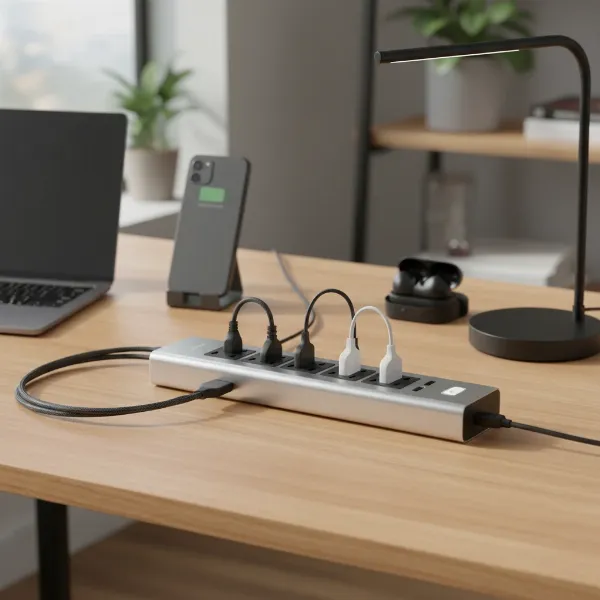 Modern power strip on a desk with multiple devices plugged in, indicating organization and charging needs.
Smart Power Strip
Smart power strips bring automation and energy efficiency to power management. These devices can be controlled remotely via smartphone apps or voice assistants, allowing users to schedule power delivery, monitor energy consumption, and even turn off individual outlets. A significant advantage of smart power strips is their ability to combat “phantom load” or “vampire power”—the electricity devices consume even when turned off but still plugged in. They often feature a “control” outlet that, when turned off, automatically cuts power to other connected, non-essential outlets.
USB Power Strip
With the proliferation of smartphones, tablets, and other USB-powered gadgets, USB power strips have become incredibly popular. These strips combine traditional AC outlets with dedicated USB-A and often faster USB-C charging ports, eliminating the need for bulky wall adapters. They are particularly convenient for bedside tables, desks, or travel, streamlining charging setups and freeing up AC outlets for other devices.
Travel Power Strip
Designed for portability and convenience on the go, travel power strips are compact and lightweight. They often feature universal outlets, international plug adapters, and multiple USB ports, making them ideal for hotels, airports, or international travel. Some even boast flat plugs or retractable cords for easy packing, ensuring you can power all your devices no matter where your adventures take you.
Comparing Different Power Strip Types
Choosing the right power strip depends heavily on your specific needs, balancing functionality with cost and protection. The table below provides a concise comparison of the most common types:
| Type | Functionality | Price Range | Durability | Special Features |
|---|---|---|---|---|
| Basic Power Strip | Multiple outlets | Low ($10-$20) | Moderate | On/off switch |
| Surge Protector | Multiple outlets, protection from voltage spikes | Medium ($20-$50) | Moderate-High | Joule rating, circuit breaker, indicator lights |
| Smart Power Strip | Multiple outlets, remote control, energy monitoring | High ($40-$80+) | Moderate | App/voice control, scheduling, phantom load reduction, Wi-Fi |
| USB Power Strip | Multiple AC outlets, dedicated USB charging ports | Medium ($25-$60) | Moderate | USB-A/USB-C ports, faster charging |
| Travel Power Strip | Compact, multiple outlets, often with USB & adapters | Medium ($20-$40) | High (for travel) | Portable, international adapters, flat plug, retractable cord |
How to Choose the Right Power Strip (Buying Guide)
Selecting the best power strip involves more than just counting outlets. A thoughtful approach ensures safety, efficiency, and longevity for your electronic ecosystem.
Assess Your Usage Needs
Begin by identifying how many devices you need to connect and their power requirements. For a small charging station, a USB power strip might suffice. For a home office with a computer, monitor, and printer, a surge protector with ample AC outlets and good spacing is crucial. Consider the location: a wall-mounted strip saves space, while a tower design is great for collaborative workspaces. Always check the wattage or amperage of your devices and ensure the power strip’s capacity can handle the cumulative load. High-power appliances like space heaters, microwaves, or refrigerators should never be plugged into a power strip; they require direct wall outlet connections.
Technical Factors to Consider
Safety and performance hinge on several technical specifications. For surge protectors, the Joule rating is paramount—aim for at least 1,000 Joules for sensitive electronics, with 2,000+ Joules providing more robust protection. A built-in circuit breaker is a must-have, as it automatically cuts power to prevent overloading and potential fires. The cord length should be adequate to reach your outlet without stretching, but avoid excessively long cords that can create tripping hazards. Outlet spacing is often overlooked but critical; wide-spaced outlets accommodate bulky power adapters without blocking adjacent sockets. Look for safety certifications like UL (Underwriters Laboratories) or ETL, which confirm the product meets recognized safety standards.
“Investing in a certified power strip is not just about convenience; it’s a foundational step in safeguarding your home and electronics from potential electrical hazards.” – Emily Chen, Electrical Safety Engineer
Brands and Pricing
The market offers a wide range of power strips at various price points. Reputable brands like Anker, Belkin, Tripp Lite, Kasa, and Tessan consistently receive high marks for quality and reliability. While budget-friendly options exist, often around $10-20, investing a bit more (e.g., $20-50 for a good surge protector or $40-80 for a smart strip) can yield significantly better protection, durability, and features. Compare prices and features across different brands, but prioritize safety certifications and robust build quality over the lowest price.
User Reviews and Expert Opinions
Before making a final decision, always consult user reviews and expert recommendations. Real-world experiences offer valuable insights into a product’s performance, durability, and any potential quirks. Look for consistent feedback regarding reliability, the effectiveness of surge protection, and customer service. Expert reviews from reputable tech publications often provide detailed testing results and comparisons, helping you understand the nuances of different models.
Top 5 Power Strips Available Today
Based on user feedback, expert testing, and a balance of features, value, and safety, here are five highly-regarded power strips currently on the market:
- Anker Surge Protector Power Strip: Often praised as a best overall choice, this model typically offers numerous AC outlets, multiple USB-A and USB-C ports with fast charging capabilities, and comprehensive safety features like surge protection (often 2,100 Joules or more), fire resistance, and overload protection. Its thoughtful design includes ample space between outlets and a solid warranty, making it a favorite for diverse home and office setups.
- Tessan Flat Plug Extension Cord Power Strip: Ideal for remote work and travel, Tessan’s flat plug design makes it incredibly compact and easy to pack. Users appreciate its widely spaced outlets, multiple USB ports for tabletop charging, and the option for wall mounting. While offering moderate surge protection (around 900 Joules), its portability and thoughtful design are key strengths.
- Belkin 12-Outlet Surge Protector Power Strip: For those needing extensive AC outlets and robust protection, Belkin’s 12-outlet model is a top contender. It boasts high surge protection (e.g., 3,940 Joules), widely spaced outlets to accommodate bulky adapters, and often includes features like sliding safety covers and cable organizers. While it might lack USB ports on some models, its focus on power delivery and surge defense is excellent.
- Trond Surge Protector (High Joule Rating): Known for serious protection, Trond offers models with exceptionally high Joule ratings, sometimes reaching 4,000 Joules. These are excellent for safeguarding large banks of sensitive electronics. Many models also include a generous number of widely spaced AC outlets and USB ports, along with options for very long cords, catering to demanding setups.
- Kasa Smart HS300 Plug Power Strip: For users seeking smart home integration, the Kasa Smart Power Strip stands out. It features individually controlled outlets via an app or voice assistants (Alexa, Google Home), energy monitoring, and robust surge protection. This strip is perfect for automating devices, managing “vampire power,” and integrating with a smart home ecosystem.
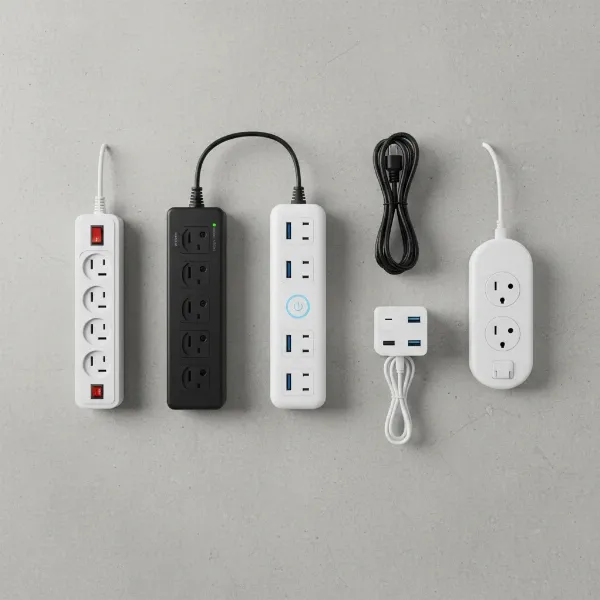 A visual comparison of various power strip types laid out on a clean surface, highlighting their unique features.
Safe Use and Maintenance of Power Strips
Even the best power strip can pose risks if not used correctly. Adhering to safety guidelines is paramount to prevent electrical hazards like overheating, fires, or damage to your devices.
Do’s:
- Plug directly into a wall outlet: Always connect the power strip directly to a wall outlet, not into another power strip or extension cord. This practice, known as “daisy-chaining,” can easily overload circuits and create a fire hazard.
- Use for low-voltage electronics: Power strips are generally designed for light-load items such as lamps, computers, phone chargers, and entertainment systems.
- Inspect regularly: Periodically check your power strips for signs of damage like frayed cords, loose outlets, discolored housing, or a burning smell. Replace any damaged unit immediately.
- Place in well-ventilated areas: Ensure power strips and their cords are not covered by carpets, rugs, or furniture, as this can trap heat and lead to overheating.
- Turn off when not in use: If your power strip has an on/off switch, use it to cut power to connected devices when they’re not in use, especially during lightning storms or when leaving home for extended periods.
Don’ts:
- Do not overload: Never plug in more devices than the power strip’s stated maximum capacity (wattage/amperage). Overloading is a leading cause of power strip failure and fires.
- Avoid high-wattage appliances: As mentioned, items like space heaters, air conditioners, microwaves, toasters, refrigerators, and power tools draw significant current and should always be plugged directly into a wall outlet.
- Keep away from moisture: Never use power strips in wet or damp environments like bathrooms, kitchens (near sinks), basements, or outdoors unless the strip is specifically rated for such conditions.
- Do not modify: Never remove the third grounding prong on a plug or tamper with the power strip’s internal components.
- No “daisy-chaining”: Reiterate: connecting one power strip to another is extremely dangerous and must be avoided.
Maintenance
Surge protectors degrade over time. Each time they absorb a voltage spike, their protective capacity is slightly diminished. Experts recommend replacing surge protectors every two to three years, or sooner if your area experiences frequent power surges or storms. If a surge protector’s indicator light (often labeled “Protected” or “Ground”) goes out, it’s a clear sign that its protective components have worn out and it needs replacement.
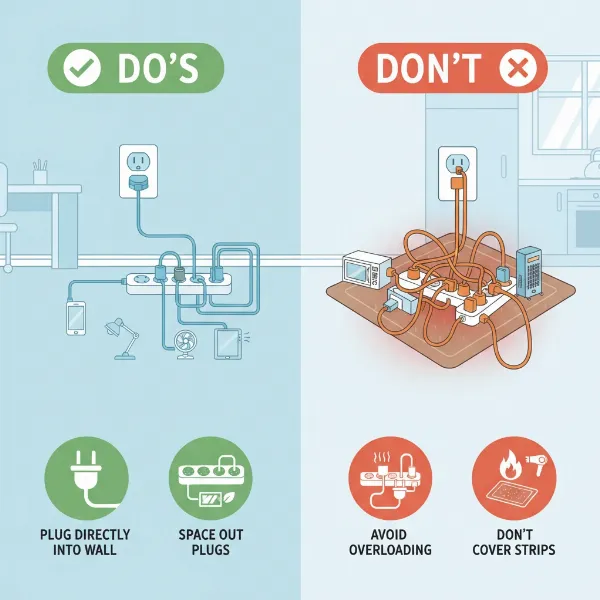 An illustrative infographic demonstrating power strip safety do's and don'ts in a home setting.
Conclusion
In our gadget-filled lives, a power strip is far more than just a convenience—it’s an essential tool for effective power management and, more importantly, safety. Whether you opt for a basic model to extend outlets, a surge protector to safeguard precious electronics, a smart strip for automation and energy savings, or a travel-friendly version for your adventures, understanding the different types and their proper use is crucial. By assessing your needs, considering technical specifications, choosing reputable brands, and diligently following safety guidelines, you can ensure your devices are powered efficiently and securely.
Are you maximizing the potential of your power strips, or could a smarter choice enhance your home’s safety and efficiency?
Frequently Asked Questions
What is the primary difference between a power strip and a surge protector?
A power strip merely provides additional electrical outlets, acting as an extension of a wall socket. A surge protector, on the other hand, includes internal components designed to absorb and divert excess voltage, protecting connected devices from electrical spikes. All surge protectors are power strips, but not all power strips offer surge protection.
How often should I replace a surge protector?
It is generally recommended to replace surge protectors every two to three years, or immediately after a significant power surge. Their protective components degrade over time with each voltage spike absorbed, eventually losing their ability to safeguard devices. Look for indicator lights on the strip that signal when protection has been compromised.
Can I plug high-wattage appliances like refrigerators into a power strip?
No, high-wattage appliances such as refrigerators, space heaters, microwaves, toasters, and air conditioners should always be plugged directly into a wall outlet. These devices draw substantial current that can overload a power strip, leading to overheating, circuit breaker trips, and potential fire hazards.
What does the Joule rating on a surge protector mean?
The Joule rating indicates the amount of energy a surge protector can absorb before it fails. A higher Joule rating signifies greater capacity to withstand power surges and provides more robust protection for your electronics. For sensitive equipment like computers and TVs, a rating of 1,000 Joules or more is advisable.
Is “daisy-chaining” power strips safe?
Absolutely not. “Daisy-chaining,” which means plugging one power strip into another, is a dangerous practice that can easily overload electrical circuits, increase fire risk, and violates most electrical safety guidelines. Always plug power strips directly into a wall outlet.
Can smart power strips save me money on electricity bills?
Yes, smart power strips can help reduce electricity consumption by automatically shutting off power to devices in standby mode (phantom load) or by allowing you to schedule power delivery. By minimizing the energy waste from devices constantly drawing power, users can often see noticeable savings on their utility bills over time.
Are power strips safe to use in damp environments like bathrooms or basements?
No, standard indoor power strips are not safe for use in damp environments. Moisture and electricity are a dangerous combination. Only use power strips specifically designed and rated for outdoor or wet conditions, and ensure they are connected to Ground Fault Circuit Interrupter (GFCI) protected outlets for added safety.