Are you constantly battling a shortage of outlets, or perhaps worried about the safety of your valuable electronics? In our increasingly connected world, where every device demands power, understanding the humble power strip is more crucial than ever. Far from being a simple extension cord, the right power strip can be a game-changer for convenience, organization, and crucially, device protection. This comprehensive guide will demystify power strips, explore their various types, and equip you with the knowledge to choose the perfect one for your home or office, ensuring your electronics are powered safely and efficiently.
What is a Power Strip and Why Do You Need One?
At its core, a power strip is a block of electrical sockets designed to convert a single wall outlet into multiple usable power points. You might know them by other names like multi-outlet adapters or extension blocks. Their primary function is straightforward: to expand your available outlets, allowing you to connect several electronic devices simultaneously. This simple ability can dramatically reduce cable clutter and transform a limited power source into a robust charging hub.
Beyond mere expansion, power strips offer significant benefits. They bring a level of convenience and organization that single wall outlets simply cannot match, especially in areas dense with electronics. Imagine a desk with a computer, monitor, printer, phone charger, and a lamp – a single power strip neatly manages all these connections. Moreover, while basic models merely distribute power, many advanced power strips incorporate features that actively protect your valuable devices from electrical anomalies, extend their lifespan, and even help you manage energy consumption more effectively. Common devices connected to power strips include laptops, smartphones, tablets, desktop computers, gaming consoles, entertainment systems, and various small home and office appliances.
 An array of electronic devices plugged into a single, organized power strip, illustrating convenience and reduced clutter.
Common Power Strip Types on the Market
Not all power strips are created equal. Depending on your needs, different types offer varying levels of functionality and protection. Understanding these distinctions is key to making an informed choice.
Basic Power Strip
A basic power strip is the simplest form, essentially an extension cord with multiple outlets. It does not include any protective features against power fluctuations.
- Description: Provides several additional AC outlets from a single wall socket. Typically made of plastic.
- Pros: Affordable, straightforward to use, and excellent for simply extending the number of available outlets.
- Cons: Offers no protection against power surges, voltage spikes, or overloads. If a power surge occurs, connected devices are vulnerable to damage.
- Suitable Uses: Ideal for low-power devices that do not contain sensitive electronics, such as lamps, basic chargers for non-critical devices, or temporary lighting.
|
Our Picks for the Best Power strip in 2026
As an Amazon Associate I earn from qualifying purchases.
|
||
| Num | Product | Action |
|---|---|---|
| 1 | Power Strip, ALESTOR Surge Protector with 12 Outlets and 4 USB Ports, 6 Feet Extension Cord (1875W/15A), 2700 Joules, ETL Listed, Black |

|
| 2 | Surge Protector Power Strip - Nuetsa Flat Plug Extension Cord with 8 Outlets and 4 USB Ports, 6 Feet Power Cord (1625W/13A), 2700 Joules, ETL Listed, Black |
|
| 3 | 6Ft Power Strip Surge Protector - Yintar Extension Cord with 6 AC Outlets and 3 USB Ports for for Home, Office, Dorm Essentials, 1680 Joules, ETL Listed, (Black) |
|
| 4 | 6 Ft Surge Protector Power Strip - 8 Widely Outlets with 4 USB Ports, 3 Side Outlet Extender with 6 Feet Extension Cord, Flat Plug, Wall Mount, Desk USB Charging Station, ETL,White |
|
| 5 | Surge Protector Power Strip - HANYCONY 8 Outlets 4 USB (2 USB C) Charging Ports, Multi Plug Outlet Extender, 5Ft Braided Extension Cord, Flat Plug Wall Mount Desk Charging Station for Home Office ETL |
|
| 6 | Power Strip Surge Protector, Olcorife Ultra Thin Flat Plug Extension Cord 5ft, 6 Outlets 3 USB Ports(1 USB C), 3 Sided Outlet Extender for Home Office Travel Dorm Room Essentials, White |
|
| 7 | Belkin 12-Outlet Surge Protector Power Strip w/ 12 AC Outlets & 8ft Flat Plug, UL-Listed Heavy-Duty Extension Cord for Home, Office, Travel, Computer, Laptop, Charger - 3,940 Joules of Protection |
|
| 8 | Anker Power Strip with 2100J Surge Protector, Outlet Extender, 5ft Extension Cord with Multiple Outlets, 12 AC, 2 USB A,1 USB C Port for 20W, Home Office, Dorm Room Essentials, TUV Listed |
|
| 9 | KMC 6-Outlet Surge Protector Power Strip 2-Pack, 900 Joules, 4-Foot Extension Cord, Overload Protection, Black |
|
| 10 | Wall Charger, Surge Protector, QINLIANF 5 Outlet Extender with 4 USB Charging Ports, 3-Sided 1680J Power Strip Multi Plug Adapter Spaced for Home Travel Office |
|
Surge Protector
Often confused with basic power strips, a surge protector is a more advanced device that provides outlets and safeguards your electronics from harmful power surges.
- Description: Contains internal components, typically Metal Oxide Varistors (MOVs), that detect sudden increases in voltage and divert excess electricity away from connected devices into the grounding wire. They usually have a joule rating, indicating the amount of energy they can absorb before failing, and often feature indicator lights to show if surge protection is active and the unit is grounded.
- Pros: Essential for protecting sensitive and expensive electronics (e.g., computers, TVs, gaming consoles, home theater systems) from damage caused by lightning strikes, power grid fluctuations, or the cycling of large appliances. Extends the lifespan of your devices.
- Cons: Generally more expensive than basic power strips. The surge protection components degrade over time and after absorbing significant surges, meaning they need to be replaced every 3-5 years or after a major event.
- Suitable Uses: Crucial for home offices, entertainment centers, and any setup involving valuable or sensitive electronic equipment.
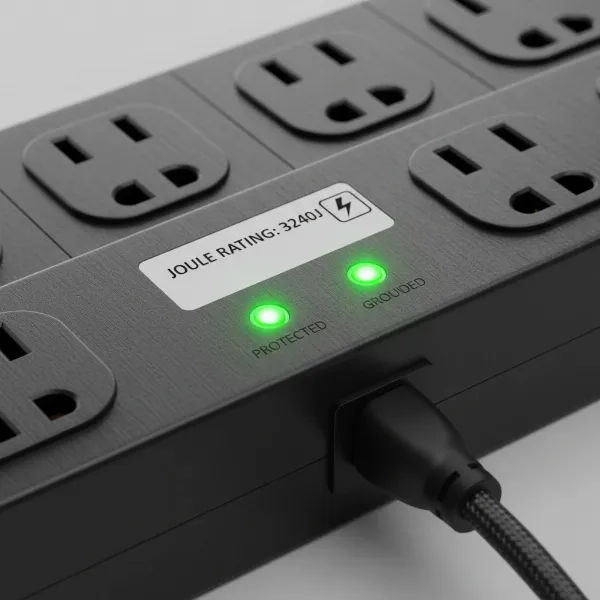 A close-up view of a surge protector with a joule rating visible and indicator lights, emphasizing its protective features.
Smart Power Strip
Smart power strips elevate convenience and energy efficiency by integrating with your smart home ecosystem.
- Description: These strips feature wireless connectivity (Wi-Fi, Zigbee, or Z-Wave), allowing for remote control via smartphone apps or voice assistants (like Amazon Alexa or Google Assistant). Many offer individual control over each outlet, scheduling capabilities, timers, and real-time energy monitoring to identify “vampire” drain from idle devices. Most smart power strips also include surge protection.
- Pros: Offers unparalleled convenience, significant energy savings by eliminating standby power, and automation capabilities. You can turn devices on/off, set schedules, and monitor energy usage from anywhere.
- Cons: Higher cost compared to traditional strips. Requires a smart home setup or compatible app. May have compatibility issues with certain smart home platforms. High-wattage appliances are generally unsafe to use.
- Suitable Uses: Tech-savvy households, smart homes, users focused on energy conservation, or anyone seeking greater control and automation over their plugged-in devices.
USB Power Strip
Designed to meet the charging needs of our many portable gadgets, USB power strips combine traditional AC outlets with USB charging ports.
- Description: These power strips include standard AC outlets alongside USB-A and/or USB-C ports. Many modern versions feature fast-charging capabilities, such as Power Delivery (PD) for USB-C, which can quickly charge smartphones, tablets, and even some laptops without requiring bulky wall adapters.
- Pros: Reduces the number of separate chargers and adapters needed, freeing up AC outlets. Provides convenient, dedicated charging for mobile devices. Fast charging ports save time.
- Cons: USB charging ports may not always offer surge protection. The number of high-power USB-C ports can be limited.
- Suitable Uses: Desks, bedside tables, living rooms, or any area where multiple mobile devices regularly need charging alongside other electronics.
Travel Power Strip
When you’re on the go, a travel power strip ensures you have adequate power, even with limited hotel outlets.
- Description: Compact, lightweight, and often feature flat plugs to fit behind furniture or in tight spaces. Some models include universal outlets or international plug adapters, making them suitable for global travel. They typically offer fewer outlets than home-based strips but prioritize portability.
- Pros: Extremely portable and space-saving. Flat plugs are ideal for constrained environments. Some models offer USB charging or surge protection, adding versatility for travelers.
- Cons: Generally have fewer outlets and lower power capacity. May not offer robust surge protection.
- Suitable Uses: Business travelers, tourists, mobile workstations, or anyone needing to power multiple devices in temporary locations with limited access to outlets.
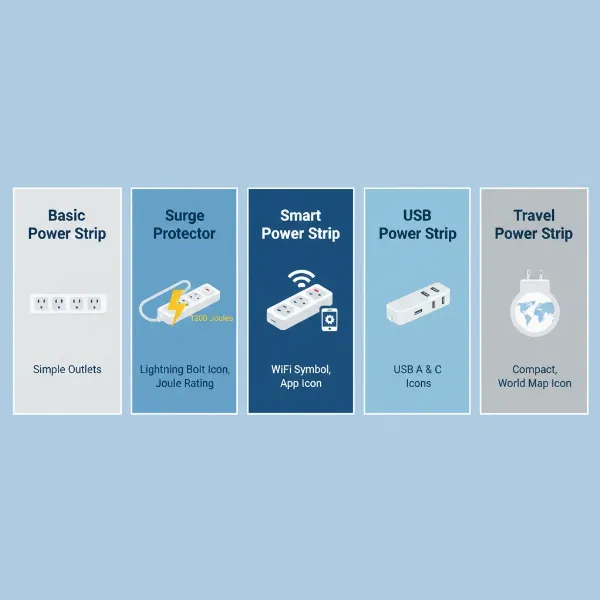 An illustrative infographic showing different types of power strips (basic, surge protector, smart, USB, travel) with icons representing their key features.
Comparing Power Strip Types
Choosing the right power strip can feel overwhelming with so many options. Here’s a comparison to help you understand the core differences:
| Type | Functionality | Price Range | Durability | Special Features | Best Use Case |
|---|---|---|---|---|---|
| Basic Power Strip | Expands outlets | Low | Basic plastic casing | On/off switch | Low-power devices (lamps, fans) |
| Surge Protector | Expands outlets + protects from voltage spikes | Medium | Sturdy plastic/metal | Joule rating, indicator lights, internal circuit breaker | Sensitive electronics (computers, TVs) |
| Smart Power Strip | Expands outlets + smart control + energy monitoring | High | Integrated tech, plastic | Wi-Fi, app/voice control, scheduling, energy tracking, individual outlet control | Smart homes, energy efficiency, automation |
| USB Power Strip | Expands AC outlets + USB charging | Medium | Sturdy plastic | USB-A/C ports, fast charging (PD) | Desks, charging multiple mobile devices |
| Travel Power Strip | Expands outlets + portability | Low-Medium | Compact, often rugged | Flat plug, universal adapters (some), compact size | Travel, mobile workstations, temporary setups |
This table highlights that while all power strips provide additional outlets, their advanced features significantly impact their value and suitability for different applications.
Choosing the Right Power Strip (Buying Guide)
Selecting the ideal power strip requires careful consideration of your specific needs and the technical aspects of the devices you intend to connect. Don’t just grab the cheapest option; a little foresight can save you money and protect your electronics in the long run.
Identify Your Usage Needs
Before anything else, clarify how and where you’ll use the power strip.
- Number of Outlets Needed: Count your current devices and anticipate future additions. Also, consider the size of your plugs; some devices come with bulky “wall wart” adapters that can block adjacent outlets. Many power strips offer widely spaced outlets to accommodate these.
- Types of Devices: Are you powering low-demand items like a lamp and a clock, or sensitive and expensive electronics such as a gaming PC, a large TV, or medical equipment? The latter absolutely requires a surge protector. High-wattage appliances like space heaters, toasters, air conditioners, or hair dryers should generally be plugged directly into a wall outlet, not a power strip, as they can overload the strip and create a fire hazard.
- Location: Will the power strip be in a dry indoor area, a humid environment like a kitchen or garage, or used for travel? Humid environments may require models with an IP (Ingress Protection) rating for splash and dust resistance, while travel strips prioritize compactness.
Key Technical Factors
Once your needs are clear, delve into the technical specifications:
- Maximum Power Rating (Wattage/Amperage): Every power strip has a maximum wattage or amperage it can safely handle. Exceeding this rating can lead to overheating, circuit breaker trips, or even fires. Calculate the total wattage of all devices you plan to connect and ensure the power strip’s rating is comfortably above that sum.
- Joule Rating (for Surge Protectors): This indicates how much energy a surge protector can absorb before it fails. A higher joule rating means better protection and a longer lifespan for the surge protector itself. For sensitive electronics, look for ratings of 1000 joules or higher.
- Safety Standards and Certifications: Always choose power strips certified by reputable testing laboratories such as Underwriters Laboratories (UL), CE, or TÜV. These certifications ensure the product meets stringent safety standards. Look for features like flame-retardant materials, an internal circuit breaker (which automatically cuts power in case of overload), and Ground Fault Circuit Interrupter (GFCI) protection for use in wet areas.
- Cord Length and Configuration: Determine how far the power strip needs to reach from your wall outlet. Power strips are available with cord lengths ranging from a few feet to over 20 feet. Consider flat-plug designs if you need to place the strip behind furniture, as they allow the plug to sit flush against the wall.
Brand, Cost, and User Feedback
Finally, consider the manufacturer and what others have experienced:
- Reputable Brands: Investing in a power strip from a well-known brand (like Anker, Belkin, Tripp Lite, Tessan, APC, Kasa Smart) often guarantees better quality, adherence to safety standards, and reliable customer support or warranties.
- Price vs. Features: While it’s tempting to opt for the cheapest option, remember that you often get what you pay for, especially with electrical safety devices. Balance the cost with the features and protection level you require. A slightly higher investment can prevent costly damage to your electronics.
- User Reviews and Expert Opinions: Before making a final decision, consult online reviews from other users and expert analyses. Real-world feedback can offer valuable insights into a product’s performance, durability, and any potential quirks.
 A person examining a power strip's technical specifications on its packaging, highlighting the importance of the buying guide.
Top Recommended Power Strips
Choosing the “best” power strip depends heavily on individual needs, but certain models consistently stand out for their blend of features, reliability, and value. Here are some categories and examples of what to look for, drawing from well-regarded brands:
- For Comprehensive Surge Protection and Outlets: Look for models like the Belkin 12-Outlet Surge Protector. These often boast a high joule rating (e.g., 4000+ joules) and come with numerous widely spaced AC outlets, perfect for home entertainment systems or extensive office setups. Many include a cable organizer and sliding safety covers for unused outlets, ensuring both protection and tidiness.
- For Smart Home Integration and Energy Management: The TP-Link Kasa Smart Wi-Fi Power Strip (HS300) is a prime example. These devices offer six individually controllable smart AC outlets, often with USB ports. Their ability to integrate with smart assistants like Alexa and Google Home, combined with energy monitoring and scheduling features, makes them excellent for automating device power and curbing “vampire” drain.
- For Versatility with USB Charging: Products like the Anker Surge Protector Power Strip frequently offer a generous combination of AC outlets and multiple USB-A and USB-C ports, including fast-charging Power Delivery (PD) options. These are ideal for users with many mobile devices alongside traditional electronics, minimizing the need for multiple wall adapters.
- For Compactness and Travel: The Tessan Flat Plug Extension Cord Power Strip exemplifies a great travel or space-saving option. Its compact design, often featuring a flat wall plug and multiple outlets with USB ports, makes it perfect for slipping into a laptop bag or fitting behind furniture without obstructing other outlets.
- For Heavy-Duty Use or Many Devices: Tower-style power strips, such as the JACKYLED Surge Protector Charging Station, are excellent for managing numerous devices in a centralized location. With 10 or more AC outlets and multiple USB ports arranged vertically, they save desk space and often include individual switches for each tier, allowing selective power control.
When making your choice, prioritize the joule rating for surge protectors, ensure enough (and appropriately spaced) outlets for your devices, and consider the added convenience and energy savings offered by smart or USB-equipped models.
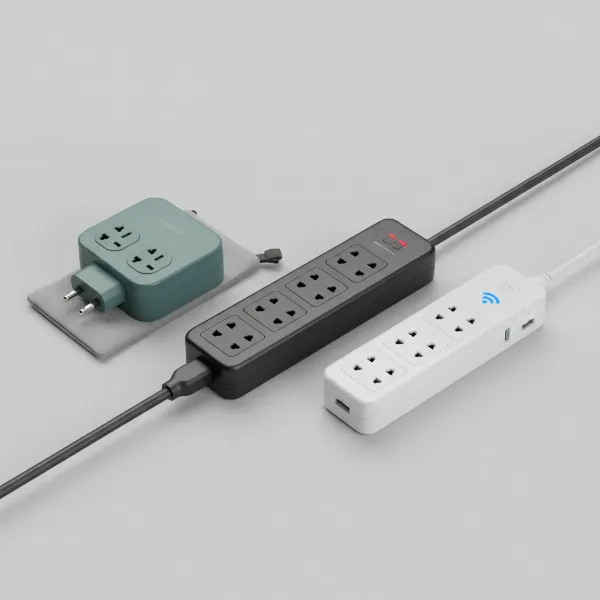 A diverse selection of different power strip models laid out, showcasing their variety in design and features.
Safe Use and Maintenance of Power Strips
Even the best power strip can become a hazard if not used correctly. Adhering to safety guidelines is paramount to prevent electrical fires, shocks, and damage to your equipment.
Safe Usage Practices:
- Avoid “Daisy-Chaining”: Never plug one power strip into another power strip, or an extension cord into a power strip, or vice versa. This practice, known as “daisy-chaining” or “piggy-backing,” can easily overload circuits and lead to overheating or fire.
- Do Not Overload: Power strips are designed for light-load items like lamps, computers, and chargers. Crucially, never plug high-wattage appliances such as space heaters, air conditioners, toasters, microwaves, or hair dryers into a power strip. These devices draw significant power and should always be plugged directly into a dedicated wall outlet.
- Ensure Proper Ventilation: Keep power strips uncovered and in well-ventilated areas. Avoid placing them under carpets, rugs, or behind furniture where heat can build up. Overheating is a common cause of power strip failure and potential fire.
- Keep Away from Moisture: Never use power strips in wet or humid environments like bathrooms, kitchens, basements, or outdoors unless the strip is specifically rated (e.g., with an IP rating) for such conditions. Water and electricity are a dangerous combination.
- Use Grounded Plugs: Always ensure your power strip has a three-prong grounded plug, and never modify or remove the grounding prong. This third prong is a critical safety feature that protects against electrical shock.
- Pull by the Plug, Not the Cord: When unplugging a device or the power strip itself, always grasp the plug firmly. Pulling on the cord can damage the internal wiring, leading to fraying, short circuits, or fire hazards.
- Unplug Unused Devices: Many electronics continue to draw a small amount of “vampire” or “phantom” power even when turned off. Unplugging devices from the power strip when not in use can save energy and reduce fire risk. Smart power strips can automate this for you.
Maintenance and Inspection:
- Regular Inspection: Periodically inspect your power strips and their cords for any signs of damage, such as frayed wires, cracks in the casing, discolored outlets, or a burning smell.
- Check for Heat: If a power strip feels hot to the touch, immediately unplug it and the devices connected to it. This indicates an overload or malfunction, and the strip should be replaced.
- Replace Surge Protectors: The surge protection components (MOVs) in surge protectors degrade over time and after absorbing electrical surges. Experts recommend replacing surge protectors every three to five years, or immediately after a major power surge. Many surge protectors have an indicator light that turns off when the protection is no longer active—this is your cue to replace it.
- Proper Storage: When not in use, store power strips in a cool, dry place. Avoid tightly coiling the cords, as this can damage the internal wires.
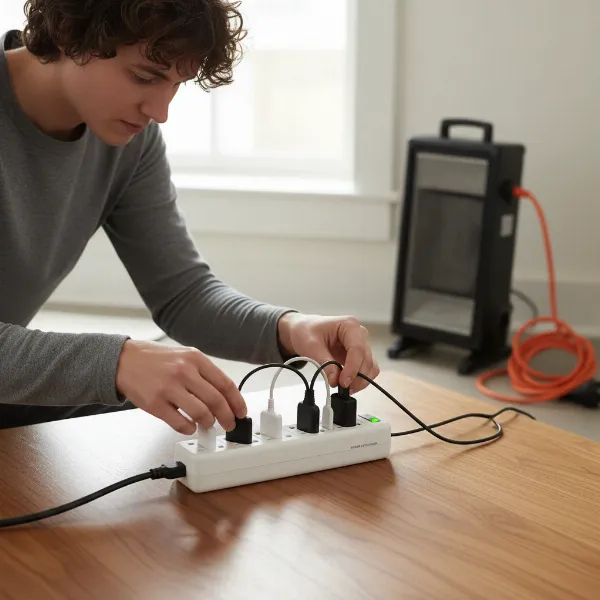 A person demonstrating safe use of a power strip, avoiding daisy-chaining and overloading, with clear visual cues for safety.
Conclusion
The question “Is a power strip worth it?” has a resounding answer: absolutely, but only if you choose and use the right one. More than just extending your outlets, the right power strip can bring order to your tangled cords, enhance energy efficiency, and, most importantly, provide a vital layer of protection for your valuable electronics. From basic models for simple tasks to sophisticated surge protectors and smart strips offering advanced control and monitoring, the market offers a solution for every need.
By understanding the distinct types of power strips, paying close attention to technical specifications like joule ratings and safety certifications, and diligently following safe usage practices, you can make an informed decision that safeguards your devices and contributes to a safer, more organized home or workspace. Take a moment to assess your needs, review your options, and invest in the power strip that empowers your digital life securely.
What kind of devices are you looking to power, and what level of protection do you think you need most?
Frequently Asked Questions
Can I plug a power strip into another power strip?
No, absolutely not. Plugging one power strip into another, a practice known as “daisy-chaining,” creates a significant fire hazard by overloading the circuit. Always plug power strips directly into a wall outlet.
How often should I replace a surge protector?
Surge protectors should typically be replaced every three to five years. Their internal components degrade over time and after absorbing power surges. Many surge protectors have an indicator light that will turn off when the protection capability is no longer active, signaling it’s time for a replacement.
Can I use a power strip for high-wattage appliances?
No, it is generally unsafe to plug high-wattage appliances like space heaters, air conditioners, refrigerators, toasters, or hair dryers into a power strip. These devices draw too much power, risking overload, overheating, and potential fire. Always plug such appliances directly into a wall outlet.
How can I tell the difference between a basic power strip and a surge protector?
A key difference is the presence of a “joule rating” on a surge protector’s packaging or label, which indicates its protection capacity. Surge protectors also typically have indicator lights for “protection” and “grounding” status, which basic power strips lack. If it doesn’t explicitly state “surge protector,” assume it’s a basic power strip.
Do smart power strips really save energy?
Yes, smart power strips can significantly save energy, especially by eliminating “vampire” or “phantom” power draw from devices left in standby mode. Features like energy monitoring, scheduling, and remote control allow you to actively manage and reduce power consumption for connected electronics.