In our increasingly connected world, where every device from smartphones to smart home hubs demands power, the humble wall outlet often feels inadequate. This common challenge leaves many wondering if a power strip is a worthy investment. A power strip, essentially a device that expands a single wall outlet into multiple usable sockets, offers a straightforward solution to power numerous gadgets simultaneously. This comprehensive guide will delve into the utility of power strips, exploring their diverse types, crucial safety considerations, and how to select the ideal one for your specific needs, ultimately helping you determine if a power strip truly is worth the space it occupies.

What is a Power Strip and Why Do You Need It?
A power strip, also widely known as a multi-outlet strip, power bar, or extension block, serves as a practical electrical accessory designed to provide several electrical outlets from a single wall receptacle. Its primary function is to expand power access, making it incredibly convenient for areas with limited wall sockets or where multiple devices are clustered together. Many modern setups, whether a home office, an entertainment center, or a bedside charging station, inevitably require more outlets than a standard wall plate provides.
The core benefit of using a power strip is its ability to offer multiple connection points from one power source, reducing clutter and the need for numerous wall adapters. While basic models simply expand the number of available outlets, more advanced versions incorporate features like individual on/off switches, which can aid in managing energy consumption by allowing users to power down specific devices when not in use. Crucially, many power strips are equipped with surge protection, a vital feature that safeguards connected electronics from sudden and potentially damaging voltage spikes. Without such a device, valuable electronics could be vulnerable to power fluctuations, which can lead to costly repairs or replacements.
Common devices typically connected to power strips include low-demand electronics such as laptop chargers, smartphone and tablet charging bricks, lamps, desktop fans, and small audio systems. However, it’s critical to understand that power strips are not designed for high-power appliances like microwaves, refrigerators, air conditioners, space heaters, or toasters. These high-wattage devices should always be plugged directly into a dedicated wall outlet to prevent overloading the power strip and creating a significant fire hazard.
Common Types of Power Strips Available Today
The market offers a diverse range of power strips, each designed to meet specific needs and provide varying levels of functionality and protection. Understanding these differences is key to making an informed choice for your home or office.
Basic Power Strip
|
Our Picks for the Best Power strip in 2026
As an Amazon Associate I earn from qualifying purchases.
|
||
| Num | Product | Action |
|---|---|---|
| 1 | Surge Protector Power Strip - HANYCONY 8 Outlets 4 USB (2 USB C) Charging Ports, Multi Plug Outlet Extender, 5Ft Braided Extension Cord, Flat Plug Wall Mount Desk Charging Station for Home Office ETL |

|
| 2 | 6 Ft Surge Protector Power Strip - 8 Widely Outlets with 4 USB Ports, 3 Side Outlet Extender with 6 Feet Extension Cord, Flat Plug, Wall Mount, Desk USB Charging Station, ETL,White |
|
| 3 | Surge Protector Power Strip - Nuetsa Flat Plug Extension Cord with 8 Outlets and 4 USB Ports, 6 Feet Power Cord (1625W/13A), 2700 Joules, ETL Listed, Black |
|
| 4 | 6Ft Power Strip Surge Protector - Yintar Extension Cord with 6 AC Outlets and 3 USB Ports for for Home, Office, Dorm Essentials, 1680 Joules, ETL Listed, (Black) |
|
| 5 | Power Strip, ALESTOR Surge Protector with 12 Outlets and 4 USB Ports, 6 Feet Extension Cord (1875W/15A), 2700 Joules, ETL Listed, Black |
|
| 6 | KMC 6-Outlet Surge Protector Power Strip 2-Pack, 900 Joules, 4-Foot Extension Cord, Overload Protection, Black |
|
| 7 | Power Strip Surge Protector, Olcorife Ultra Thin Flat Plug Extension Cord 5ft, 6 Outlets 3 USB Ports(1 USB C), 3 Sided Outlet Extender for Home Office Travel Dorm Room Essentials, White |
|
| 8 | Anker Power Strip with 2100J Surge Protector, Outlet Extender, 5ft Extension Cord with Multiple Outlets, 12 AC, 2 USB A,1 USB C Port for 20W, Home Office, Dorm Room Essentials, TUV Listed |
|
| 9 | Belkin 12-Outlet Surge Protector Power Strip w/ 12 AC Outlets & 8ft Flat Plug, UL-Listed Heavy-Duty Extension Cord for Home, Office, Travel, Computer, Laptop, Charger - 3,940 Joules of Protection |
|
| 10 | Wall Charger, Surge Protector, QINLIANF 5 Outlet Extender with 4 USB Charging Ports, 3-Sided 1680J Power Strip Multi Plug Adapter Spaced for Home Travel Office |
|
A basic power strip is the simplest form of a multi-outlet device. It functions as an extension cord with multiple receptacles, allowing you to plug in several devices into a single wall outlet. These strips are often the most affordable option, offering a straightforward solution for expanding power access without additional features.
They are ideal for non-sensitive, low-power electronics that do not require protection from voltage fluctuations, such as desk lamps, phone chargers, or small radios. However, a significant drawback is the complete lack of surge protection, leaving connected devices vulnerable to power surges. While convenient for increasing outlet availability, they do not offer any safeguard against electrical spikes.
Surge Protector
Distinguished from basic power strips by their protective capabilities, surge protectors incorporate internal components, such as Metal Oxide Varistors (MOVs), designed to divert excess voltage away from connected electronics during a power surge. This protective feature is crucial for safeguarding valuable and sensitive devices like computers, televisions, and gaming consoles from potential damage. Surge protectors come with a “joule rating,” which indicates the amount of energy they can absorb before their protection capacity is depleted. A higher joule rating signifies greater protection and a longer lifespan for the unit.
While offering vital defense against voltage spikes, surge protectors are not immune to overloading. Plugging too many high-power devices into even a surge-protected strip can still lead to overheating and potential hazards. They are best suited for areas where expensive or data-sensitive electronics are in use, providing peace of mind against unpredictable power fluctuations.
Smart Power Strip
Smart power strips elevate the concept of power management by integrating Wi-Fi connectivity and often individual outlet control. These advanced strips allow users to manage connected devices remotely via a smartphone app or voice commands through smart assistants like Alexa or Google Assistant. Many smart power strips also include surge protection and USB charging ports, combining convenience with safety.
The primary advantages include enhanced energy efficiency through scheduling and remote control of individual outlets, helping to reduce “phantom load” from devices drawing standby power. However, they typically come at a higher price point and require a stable Wi-Fi connection for their smart features to function. Smart power strips are an excellent choice for tech-savvy households or offices looking to optimize energy usage and integrate power control into their smart home ecosystem.
Power Strip with USB Ports
Designed to address the proliferation of USB-powered devices, these power strips combine traditional AC outlets with integrated USB-A and/or USB-C charging ports. This feature eliminates the need for bulky wall adapters, freeing up AC outlets for other devices and reducing cable clutter. Users can directly plug in and charge smartphones, tablets, smartwatches, and other gadgets.
The convenience of integrated USB ports is a major draw, especially for crowded desks or bedside tables. However, it’s important to check the amperage rating of the USB ports, as some might share power, potentially leading to slower charging speeds if multiple devices are connected simultaneously. These strips are highly beneficial for anyone with numerous portable electronics, offering a streamlined charging solution.
Travel Power Strip
Travel power strips are specifically designed for portability and convenience on the go. They are typically compact, lightweight, and often feature a combination of AC outlets and USB ports, sometimes including international plug adapters. Their small footprint makes them easy to pack into luggage, ensuring that travelers have ample charging options in hotels, airports, or temporary workspaces.
While incredibly practical for travelers and mobile workers, these strips usually have fewer outlets and a lower capacity compared to full-sized home models. They often include some level of surge protection to safeguard devices while traveling. Travel power strips are ideal for keeping multiple devices charged without monopolizing hotel room outlets, proving invaluable for business trips or vacations.
Comparison of Popular Power Strip Types
Choosing the right power strip depends heavily on your specific needs, balancing functionality with budget. Here’s a comparative overview of the common types:
| Feature | Basic Power Strip | Surge Protector | Smart Power Strip | USB Power Strip | Travel Power Strip |
|---|---|---|---|---|---|
| Primary Function | Outlet expansion | Outlet expansion + surge protection | Smart control + outlet expansion + surge protection | Outlet expansion + USB charging | Portable outlet expansion + USB charging |
| Surge Protection | No | Yes (joule rating) | Often yes | Often yes | Often yes |
| Smart Features | No | No | Yes (app/voice control, scheduling) | No | No |
| USB Ports | No | Rarely | Often yes | Yes | Often yes |
| Energy Saving | No | No | Yes (individual control, scheduling) | No | No |
| Cost | Low | Moderate | High | Moderate | Moderate |
| Key Advantage | Simple outlet expansion | Device protection | Remote control, automation | Versatile charging | Portability |
| Best For | Non-sensitive, low-power devices | Valuables like computers, TVs | Smart homes, energy efficiency | Desks, charging multiple gadgets | Travelers, temporary setups |
How to Choose the Right Power Strip (Buying Guide)
Selecting the appropriate power strip is a critical decision that impacts both convenience and safety. Consider these factors to ensure your choice aligns with your specific requirements.
Determine Your Usage Needs
Start by evaluating where and how you intend to use the power strip. The devices you plan to connect and their location will largely dictate the type of strip you need.
- Number of Outlets: Count the devices you need to plug in and then add a few extra for future expansion. Remember that larger power adapters or “wall warts” can block adjacent outlets, so look for strips with widely spaced outlets or rotating sockets if you have many bulky plugs.
- Type of Devices: For low-power items like lamps or phone chargers, a basic power strip might suffice. However, for sensitive and expensive electronics such as computers, gaming consoles, or home theater systems, a surge protector is indispensable. Critically, never plug high-wattage appliances like space heaters, refrigerators, air conditioners, or microwaves into any power strip; these should always go directly into a wall outlet to prevent overloading.
- Location: Consider the environment where the power strip will be placed. Indoor-only strips are standard, but if you need power in humid areas like a garage or outdoors, you must choose a model specifically rated for those conditions, often with an IP (Ingress Protection) rating to indicate water and dust resistance.
Key Technical Factors to Consider
Beyond the basic number of outlets, several technical specifications are vital for safety and performance.
- Maximum Power Capacity (Wattage/Amperage): Every power strip has a maximum wattage or amperage it can safely handle. Exceeding this limit is a primary cause of overheating and electrical fires. Always calculate the total wattage of the devices you intend to plug in and ensure it is below the power strip’s maximum rating. Look for a strip with a circuit breaker, which will trip and cut power if an overload occurs, preventing damage.
- Surge Protection (Joule Rating): If you opt for a surge protector, the joule rating is paramount. A higher joule rating (e.g., 1000 Joules or more) indicates a greater capacity to absorb energy spikes, offering better protection for your electronics. Additionally, check the “suppressed voltage rating”; a lower number (e.g., 330V) signifies faster clamping action and superior protection against surges.
- Safety Standards and Certifications: Always prioritize power strips that bear safety certifications from reputable organizations like UL (Underwriters Laboratories) or ETL (Intertek). These certifications confirm that the product meets stringent safety standards, reducing the risk of electrical hazards. Look for features like flame-retardant materials, individual circuit breakers, short-circuit protection, and child-safe outlet covers.
- Cable Quality and Length: The power cord should be of adequate length to reach your devices without needing an extension cord (never daisy-chain power strips). Ensure the cable is thick enough for the intended load; a minimum of 1.5 mm² wire gauge is often recommended for general use to prevent overheating, especially under heavy loads.
Brand Reputation and Pricing
The market is flooded with power strips at various price points. While it might be tempting to opt for the cheapest option, investing in a reliable brand is a wise decision for safety and longevity.
- Reputable Brands: Brands like Anker, Belkin, Kasa, Tripp Lite, CyberPower, and Tessan are widely recognized for producing quality power strips and surge protectors. Checking user reviews and expert ratings can provide valuable insights into product performance and reliability.
- Price vs. Features: Basic power strips are inexpensive, typically ranging from $10-$20. Surge protectors usually fall in the $20-$50 range, with higher joule ratings and more outlets increasing the price. Smart power strips and those with advanced USB-C fast charging capabilities will be at the higher end, often $50 or more. Consider your budget, but prioritize safety and essential features over cost savings, especially for protecting valuable electronics.
“When it comes to power strips, cutting corners on price can cost you significantly more in the long run. Always opt for certified products with robust safety features; your electronics and home depend on it.” – Electrical Safety Expert
Top Power Strips Recommended for 2026
Given the array of options, here are some highly-rated power strips that cater to different needs, balancing quality, features, and value. These selections reflect products praised for their performance, safety, and user satisfaction.
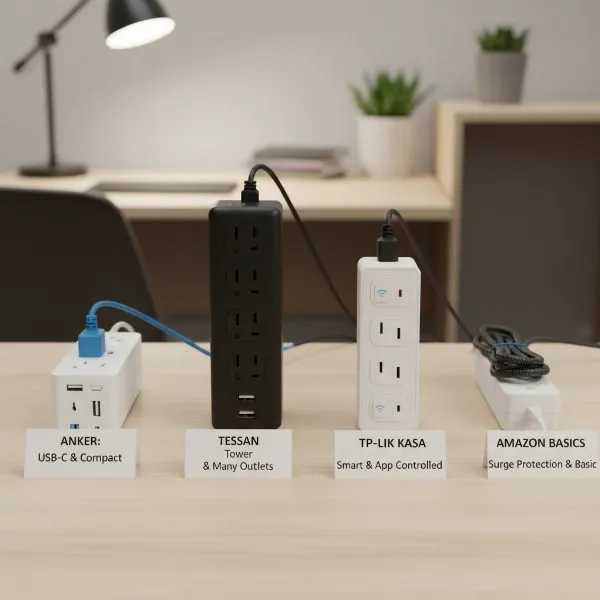
- Anker Surge Protector Power Strip: A perennial favorite, Anker’s surge protectors are often praised for their robust build quality and comprehensive features. Models like the Anker 351 typically offer a generous number of AC outlets (e.g., 12) alongside multiple USB-A and USB-C ports, often with fast-charging capabilities. With high joule ratings (e.g., 2100 Joules), they provide excellent protection for a wide range of devices, making them ideal for busy workstations or entertainment centers.
- Belkin 12-Outlet Surge Protector: When maximum AC outlets and superior surge protection are the priority, Belkin’s high-capacity surge protectors are a top contender. Models featuring 12 outlets often boast very high joule ratings (e.g., 4320 Joules), making them suitable for safeguarding multiple sensitive and expensive electronics. Many Belkin strips also feature widely spaced or pivotable outlets to accommodate bulky adapters without blocking adjacent sockets.
- TP-Link Kasa Smart Power Strip HS300: For those seeking smart home integration, the Kasa Smart Power Strip stands out. It typically offers six individually controllable smart outlets and three USB charging ports, all with integrated surge protection. Users can manage connected devices remotely via the Kasa app, set schedules, or use voice commands with Alexa or Google Assistant, optimizing energy use and convenience for smart homes.
- Tessan Flat Plug Extension Cord Power Strip: This compact and versatile power strip is excellent for remote work setups, travel, or confined spaces. Featuring a flat plug, it can sit flush against a wall, and its design often includes multiple widely spaced AC outlets and USB ports. Its portability and space-saving design make it perfect for temporary setups or environments where a bulky power strip isn’t practical.
- Amazon Basics 6-Outlet Surge Protector: For users on a budget who still require basic surge protection, the Amazon Basics 6-Outlet Surge Protector offers excellent value. While its joule rating might be lower than premium models (e.g., 790 Joules), it provides essential protection for everyday electronics at an affordable price, making it a solid choice for general household use where cost is a significant factor.
Safe Usage and Maintenance of Power Strips
Ensuring the safe operation and proper maintenance of your power strip is paramount to prevent electrical hazards such as overheating, short circuits, and fires. Adhering to these guidelines will extend the lifespan of your power strip and, more importantly, protect your home and devices.
Do’s for Safe Power Strip Use:
- Plug High-Wattage Appliances Directly into Wall Outlets: Always connect high-power devices like space heaters, air conditioners, microwaves, toasters, refrigerators, freezers, or power tools directly into dedicated wall outlets. Power strips are not designed to handle the high current draw of these appliances and can quickly overload, leading to dangerous situations.
- Choose Certified Products: Only purchase power strips that are certified by reputable safety organizations like UL (Underwriters Laboratories) or ETL (Intertek). These certifications indicate that the product meets specific safety standards.
- Ensure Proper Placement: Place power strips in well-ventilated areas, away from heat sources, flammable materials, and moisture. Keep them out of reach of children and pets. For outdoor use, ensure you are using a power strip specifically rated for outdoor conditions.
- Inspect Regularly for Damage: Periodically check your power strips and their cords for any signs of wear and tear, such as frayed wires, discolored outlets, loose connections, or a burning smell. If you notice any damage, immediately unplug the strip and replace it. A power strip that feels hot to the touch is also a warning sign of a potential overload.
- Pull by the Plug, Not the Cord: When unplugging a device or the power strip itself, always grasp the plug firmly and pull directly. Yanking on the cord can damage the internal wiring, creating a safety hazard.
- Unplug Unused Devices: When devices are not in use, especially overnight or when you leave home, unplug them from the power strip. For smart power strips, use their scheduling features or individual outlet controls to cut power, which not only saves energy but also reduces potential fire risks.
Don’ts for Safe Power Strip Use:
- Do Not Overload: Never exceed the maximum wattage or amperage rating of your power strip. Overloading is one of the most common causes of power strip failures and electrical fires. Indications of an overload include the strip feeling hot, circuit breakers tripping, devices malfunctioning, or flickering lights and buzzing sounds.
- Do Not Daisy-Chain: Absolutely never plug one power strip into another power strip, or into an extension cord. This practice, known as “daisy-chaining,” significantly increases the risk of overloading the circuit and can lead to overheating, electrical fires, and equipment damage.
- Avoid Running Cords Under Carpets, Rugs, or Furniture: Running power cords or strips under coverings or heavy objects can prevent heat dissipation, leading to overheating. It also makes it difficult to detect damage to the cord, and the constant pressure can fray insulation, creating a shock or fire hazard.
- Do Not Modify Plugs: Never remove the ground prong (the third, round prong) from a three-prong plug. This prong is a critical safety feature that protects against electrical shock by providing a path for fault current to safely dissipate.
- Do Not Use Damaged Strips: If a power strip shows any signs of damage or malfunction, discontinue use immediately. Attempting to repair a damaged power strip yourself is dangerous and not recommended; replace it with a new, certified unit.
By diligently following these safety precautions, you can harness the convenience of power strips without compromising the safety of your home and electronics.
Conclusion
In a world increasingly reliant on electronic devices, the question, “Is a power strip worth it?” can be definitively answered with a resounding “yes,” provided it is chosen and used correctly. Power strips offer unparalleled convenience, transforming a single wall outlet into multiple connection points and helping to manage the often-tangled mess of cables. More importantly, when you opt for a surge protector, these devices become essential guardians, protecting your valuable electronics from unexpected and damaging power spikes.
However, the true value of a power strip lies not just in its presence, but in understanding its limitations and adhering to strict safety guidelines. Choosing a certified product that matches your specific power needs, avoiding overloading, and recognizing the critical difference between a basic power strip and a surge protector are paramount. By making informed decisions, you can leverage the benefits of power strips to enhance your daily life, keep your devices powered, and maintain a safe electrical environment in your home or office.
What intelligent devices will you power with your next surge protector?
Frequently Asked Questions
Are all power strips surge protectors?
No, not all power strips include surge protection. Basic power strips simply offer multiple outlets without any internal components to protect against voltage spikes. Surge protectors, identifiable by a joule rating, contain specific technology to divert excess voltage away from connected devices.
Can I plug a heater or air conditioner into a power strip?
No, you should never plug high-wattage appliances like space heaters, air conditioners, refrigerators, or microwaves into any power strip. These devices draw significant current, which can overload a power strip, leading to overheating, circuit breaker trips, and potential fire hazards. They should always be plugged directly into a dedicated wall outlet.
How often should I replace a surge protector?
The lifespan of a surge protector is not infinite. Its protective components degrade over time and with each surge absorbed. It’s generally recommended to replace a surge protector every 3 to 5 years, or immediately after a major power surge (e.g., a lightning strike) even if it appears to be working. Many have indicator lights that signal when protection has been depleted.
What does a joule rating mean on a surge protector?
The joule rating on a surge protector indicates the amount of energy it can absorb before failing. A higher joule rating signifies greater capacity to withstand power spikes and often suggests a longer lifespan for the protector. For sensitive and expensive electronics, a joule rating of 1000 or higher is generally recommended for robust protection.
Can power strips help save energy?
While basic power strips do not inherently save energy, smart power strips with individual outlet controls or scheduling features can help reduce energy consumption. These features allow you to remotely turn off devices when not in use, eliminating “phantom load” from electronics that draw power even when turned off but still plugged in.