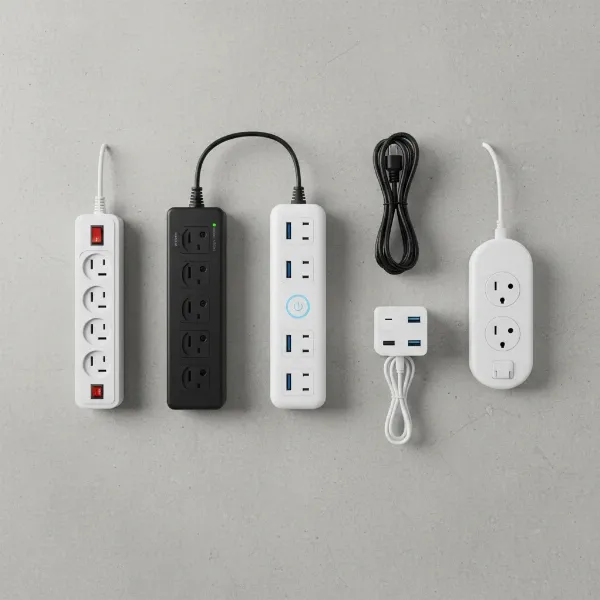
In today’s interconnected homes, every family member likely has multiple devices vying for a precious electrical outlet. From smartphones and tablets to gaming consoles, smart home gadgets, and laptops, the demand for power is constant and ever-growing. A simple wall outlet can quickly become a bottleneck, leading to a tangled mess of cords and, more importantly, potential safety hazards. This comprehensive guide, crafted by an expert with over a decade of experience in home electronics, will help you navigate the world of power strips to find the perfect solution that keeps your family’s devices powered, protected, and organized. We’ll explore different types, essential features, and top considerations to ensure you make an informed decision for a safe and efficient home.
What is a Power Strip and Why Your Family Needs One?
At its core, a power strip, also often called a power bar, extension block, or multi-outlet strip, is a device that provides multiple electrical outlets from a single wall receptacle. While the basic function is simply to expand the number of available sockets, modern power strips offer far more than just convenience. They are crucial for managing the myriad of electronic devices found in contemporary households, consolidating charging, and streamlining power access.
The primary benefits for a family home include eliminating the need for numerous wall adapters, organizing unsightly cables, and, with the right features, protecting valuable electronics from electrical fluctuations. Imagine a single hub where phones, tablets, e-readers, and smartwatches can all charge simultaneously without occupying every wall outlet. Power strips are commonly used for computers and their peripherals, home entertainment systems, kitchen gadgets, and personal charging stations in bedrooms. They become an indispensable tool for maintaining a functional and tidy living space.
Popular Types of Power Strips for Family Homes
Not all power strips are created equal. Different types offer distinct features designed for specific needs and levels of protection. Understanding these variations is key to selecting the ideal strip for your family’s diverse requirements.
Basic Power Strip
A basic power strip is essentially an extension cord with multiple outlets. It’s the simplest and often the most affordable option, providing additional plug-in points where wall outlets are scarce.
- Description: Offers multiple AC outlets, typically with a single on/off switch for all connected devices.
- Pros: Inexpensive, provides extra outlets, useful for low-power devices.
- Cons: Offers no protection against power surges, can be overloaded easily if not careful.
- Suitable Applications: Charging non-sensitive devices like lamps, phone chargers (if the charger itself has protection), or small appliances where surge protection isn’t critical.
|
Our Picks for the Best Power strip in 2026
As an Amazon Associate I earn from qualifying purchases.
|
||
| Num | Product | Action |
|---|---|---|
| 1 | Power Strip Surge Protector, Olcorife Ultra Thin Flat Plug Extension Cord 5ft, 6 Outlets 3 USB Ports(1 USB C), 3 Sided Outlet Extender for Home Office Travel Dorm Room Essentials, White |

|
| 2 | Surge Protector Power Strip - HANYCONY 8 Outlets 4 USB (2 USB C) Charging Ports, Multi Plug Outlet Extender, 5Ft Braided Extension Cord, Flat Plug Wall Mount Desk Charging Station for Home Office ETL |
|
| 3 | Surge Protector Power Strip - Nuetsa Flat Plug Extension Cord with 8 Outlets and 4 USB Ports, 6 Feet Power Cord (1625W/13A), 2700 Joules, ETL Listed, Black |
|
| 4 | KMC 6-Outlet Surge Protector Power Strip 2-Pack, 900 Joules, 4-Foot Extension Cord, Overload Protection, Black |
|
| 5 | Anker Power Strip with 2100J Surge Protector, Outlet Extender, 5ft Extension Cord with Multiple Outlets, 12 AC, 2 USB A,1 USB C Port for 20W, Home Office, Dorm Room Essentials, TUV Listed |
|
| 6 | Belkin 12-Outlet Surge Protector Power Strip w/ 12 AC Outlets & 8ft Flat Plug, UL-Listed Heavy-Duty Extension Cord for Home, Office, Travel, Computer, Laptop, Charger - 3,940 Joules of Protection |
|
| 7 | Power Strip, ALESTOR Surge Protector with 12 Outlets and 4 USB Ports, 6 Feet Extension Cord (1875W/15A), 2700 Joules, ETL Listed, Black |
|
| 8 | 6Ft Power Strip Surge Protector - Yintar Extension Cord with 6 AC Outlets and 3 USB Ports for for Home, Office, Dorm Essentials, 1680 Joules, ETL Listed, (Black) |
|
| 9 | Wall Charger, Surge Protector, QINLIANF 5 Outlet Extender with 4 USB Charging Ports, 3-Sided 1680J Power Strip Multi Plug Adapter Spaced for Home Travel Office |
|
| 10 | 6 Ft Surge Protector Power Strip - 8 Widely Outlets with 4 USB Ports, 3 Side Outlet Extender with 6 Feet Extension Cord, Flat Plug, Wall Mount, Desk USB Charging Station, ETL,White |
|
Surge Protector
A surge protector is a step up from a basic power strip, incorporating crucial technology to safeguard your electronics from unexpected voltage spikes. These spikes, which can be caused by lightning strikes, utility power fluctuations, or even large appliances cycling on and off, can severely damage or destroy sensitive devices.
- Description: Features internal components, such as Metal Oxide Varistors (MOVs), that divert excess electrical energy away from connected devices during a power surge. Often includes an indicator light to confirm protection is active and a joule rating to indicate its capacity to absorb energy.
- Pros: Protects expensive electronics (computers, TVs, gaming consoles) from damage, offers peace of mind.
- Cons: Generally more expensive than basic power strips, protection components degrade over time and need replacement.
- Suitable Applications: Essential for home offices, entertainment centers, and any area with valuable or sensitive electronics.
Smart Power Strip
For the tech-savvy family, smart power strips integrate with your smart home ecosystem, offering advanced control and energy management capabilities.
- Description: Equipped with Wi-Fi connectivity, these strips can be controlled via a smartphone app or voice assistants like Amazon Alexa or Google Assistant. Individual outlets can often be controlled independently, allowing for scheduling or remote activation.
- Pros: Enhanced energy efficiency through scheduling and remote control, convenient for automating devices, monitoring energy usage.
- Cons: Higher cost, requires a stable Wi-Fi connection, may involve a steeper learning curve for setup.
- Suitable Applications: Smart homes, controlling lights or devices on a schedule, energy conservation, setting up routines for family members.
Power Strip with USB Ports
In a family home, USB-powered devices are ubiquitous. Power strips with integrated USB-A and/or USB-C ports eliminate the need for bulky wall adapters, freeing up AC outlets and reducing clutter.
- Description: Combines traditional AC outlets with dedicated USB charging ports, often featuring “smart charging” technology to optimize power delivery to connected devices. Many now include fast-charging USB-C ports.
- Pros: Reduces adapter clutter, convenient for charging multiple mobile devices, frees up AC outlets.
- Cons: USB ports may share a limited power output, potentially slowing charging if many devices are connected simultaneously.
- Suitable Applications: Bedrooms, living rooms, and communal charging stations where multiple phones, tablets, or other USB-powered gadgets are frequently charged.
Travel Power Strip
While not for permanent home installation, travel power strips are compact and designed for on-the-go use, making them useful for family vacations.
- Description: Smaller footprint, often with a flat plug and short cord, and may include universal voltage compatibility and USB ports.
- Pros: Highly portable, expands limited hotel outlets, often includes surge protection suitable for travel.
- Cons: Fewer outlets, not designed for heavy-duty, continuous use at home.
- Suitable Applications: Family travel, temporary charging setups when space is limited.
Comparing Power Strip Types: A Family’s Quick Guide
Choosing the right power strip depends on a balance of functionality, safety, and budget. Here’s a comparative overview to help your family decide:
| Type | Primary Function | Typical Price Range | Durability | Special Features |
|---|---|---|---|---|
| Basic Power Strip | Expands number of AC outlets | Low ($10-$20) | Moderate | On/off switch for all outlets |
| Surge Protector | Protects devices from voltage spikes | Medium ($20-$50) | High | Joules rating, indicator lights, often includes circuit breaker |
| Smart Power Strip | Expands outlets + smart control and automation | High ($40-$80+) | Moderate | Wi-Fi connectivity, app/voice control, scheduling, energy monitoring |
| USB Power Strip | Expands outlets + integrated USB charging | Medium ($25-$60) | Moderate | USB-A, USB-C (some fast-charging), often widely spaced outlets |
| Travel Power Strip | Compact outlet expansion for portability | Low-Medium ($15-$40) | High (compact) | Small size, flat plug, often global voltage compatibility |
How to Choose the Right Power Strip for Your Household (Buying Guide)
Selecting the best power strip involves more than just picking one with enough outlets. Consider these factors to ensure it meets your family’s needs and provides optimal safety.
Assess Your Family’s Needs
Start by identifying what you need the power strip to do.
- Number of Outlets: Count the devices that will be plugged in and add a few extra for future expansion. Many family-oriented strips offer 8 to 12 AC outlets, often with wide spacing to accommodate bulky power adapters without blocking adjacent sockets.
- Type of Devices: Are you powering sensitive electronics like computers and gaming systems, or just charging phones and powering lamps? This dictates whether surge protection is a necessity.
- Location of Power Strip: Will it be on a desk, behind an entertainment center, or in a communal charging area? This influences cord length, plug type (flat plugs are great behind furniture), and physical design (tower vs. flat strip).
Essential Technical Specifications
Dive into the technical details to ensure safety and compatibility.
- Maximum Power (Watts/Amps): Every power strip has a maximum electrical load it can safely handle. Add up the wattage of all devices you intend to plug in. Ensure the total is below the strip’s rating (usually 1875W or 15A at 125V). Overloading is a common cause of electrical fires.
- Surge Protection: If choosing a surge protector, look for a high joule rating (2000+ Joules is recommended for sensitive electronics) and a low suppressed voltage rating (e.g., 330V is better than 400V). Higher joules mean greater capacity to absorb a surge, while lower suppressed voltage means faster protection.
- Safety Standards: Always look for certification from reputable safety organizations, such as UL (Underwriters Laboratories) or ETL. These certifications indicate the product has been tested to meet stringent safety standards for fire and electrical shock hazards.
- Cord Length: Measure the distance from your wall outlet to where the power strip will reside. Choose a cord that is long enough to reach without being stretched, but not so long that it creates excess clutter or a tripping hazard. Common lengths range from 3 to 10 feet.
Brand Reputation and Budget
While it might be tempting to opt for the cheapest option, investing in a reputable brand often means better safety features, durability, and a reliable warranty. Well-known brands like Anker, Belkin, Tripp Lite, and CyberPower consistently receive high marks for their quality and safety.
Compare prices across different brands and types, but prioritize safety and features over the lowest price point, especially for surge protectors. Remember, the cost of replacing damaged electronics far outweighs the savings on a cheap, unprotective power strip.
User Reviews and Expert Opinions
Before finalizing your purchase, take time to read user reviews and expert assessments. Real-world experiences can highlight practical pros and cons, while expert reviews often provide in-depth analysis of technical performance and safety. Look for patterns in feedback regarding durability, ease of use, and actual surge protection performance.
Top 3 Power Strips for Family Use
Based on widespread needs for family homes, here are categories of power strips that consistently deliver on safety, convenience, and performance:
-
The High-Capacity Surge Protector with USB: Ideal for central living areas or home offices, these strips offer a generous number of AC outlets (10-12) with ample spacing, robust surge protection (2100+ Joules), and multiple USB-A and fast-charging USB-C ports. They are perfect for powering a TV, gaming console, sound system, and charging everyone’s mobile devices simultaneously.
-
The Smart Power Strip for Automated Homes: For families embracing smart home technology, a smart power strip provides not just extra outlets but also individual control over each one via app or voice. This allows for scheduled powering of devices, energy monitoring, and remote control, making it convenient to manage lights, chargers, and small appliances from anywhere.
-
The Compact USB Charging Tower: Excellent for bedrooms or smaller communal spaces, these vertical tower designs save space while offering a mix of AC outlets and a high concentration of USB ports. Many feature individual switches for different tiers of outlets, and some even have retractable cords for neat storage, perfect for reducing cable clutter on nightstands or desks.
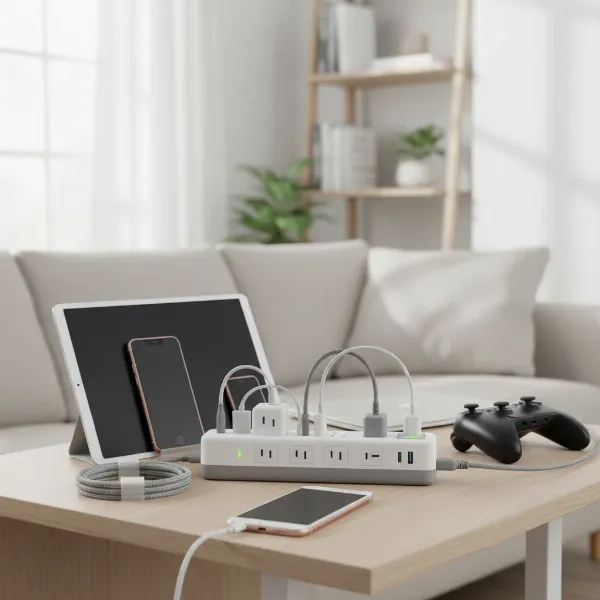 A family's devices charging safely on a modern power strip with surge protection and USB ports
Safe Usage and Maintenance for Your Family’s Power Strip
Even the best power strip needs to be used and maintained correctly to ensure your family’s safety and the longevity of your devices.
- Avoid Overloading: Never exceed the power strip’s maximum wattage or amperage rating. High-power appliances like space heaters, refrigerators, or hair dryers should always be plugged directly into a wall outlet, not a power strip. Overloading can cause overheating, tripping circuit breakers, or even fires.
- No Daisy-Chaining: Never plug one power strip into another. This practice, known as “daisy-chaining,” significantly increases the risk of overloading circuits and can lead to dangerous overheating and fire hazards. Each power strip should always be plugged directly into a wall outlet.
- Proper Placement: Place power strips in open areas where they can dissipate heat, away from flammable materials. Avoid covering them with rugs or furniture, which can trap heat. Ensure they are placed out of reach of young children and pets, or use models with child safety covers.
- Inspect Regularly: Periodically check your power strips for signs of damage, such as frayed cords, cracked housings, or discoloration. If a surge protector’s indicator light shows it’s no longer providing protection, replace it immediately. Surge protectors sacrifice their internal components to protect your devices, meaning they don’t last forever.
- Replace When Needed: Most surge protectors have a lifespan, especially after enduring several power surges. Manufacturers often recommend replacing them every 3-5 years, or immediately after a major electrical event like a lightning strike, regardless of the indicator light.
“A common misconception is that all power strips provide surge protection. This isn’t true. Always look for a joule rating and UL certification to ensure your family’s valuable electronics are genuinely protected from voltage spikes.” – Dr. Eleanor Vance, Electrical Safety Consultant
Conclusion
Choosing the best power strip for your family is an important decision that impacts convenience, organization, and most critically, safety within your home. By understanding the different types available—from basic models to advanced surge protectors and smart power strips with USB charging—you can select a solution that perfectly matches your household’s unique needs. Prioritizing features like adequate outlets, robust surge protection with a high joule rating, and adherence to safety standards like UL certification will ensure that your devices are not only powered but also meticulously protected. With proper usage and regular maintenance, a quality power strip will serve your family reliably for years, keeping your home connected and secure. What essential power strip feature could your family not live without in today’s tech-filled world?
Câu Hỏi Thường Gặp
How many joules of surge protection do I need for my family’s electronics?
For general family electronics like TVs, computers, and gaming consoles, a surge protector with a joule rating of 2000 or higher is highly recommended for robust protection against voltage spikes. The higher the joule rating, the more energy the protector can absorb before it fails, offering better long-term safeguarding for your valuable devices.
Can I plug multiple high-wattage appliances into a single power strip?
No, it is generally unsafe to plug multiple high-wattage appliances (such as space heaters, microwave ovens, or hair dryers) into a single power strip. These devices draw significant current and can overload the power strip, leading to overheating, fire hazards, or tripping circuit breakers. Always plug high-wattage appliances directly into a wall outlet.
How often should I replace my surge protectors?
Surge protectors do not last indefinitely because their internal components (MOVs) degrade with each surge they absorb. It is generally recommended to replace surge protectors every 3 to 5 years, or immediately after a severe electrical event like a lightning strike, even if they appear to be functioning. Many surge protectors have an indicator light that signals when the protection has expired.