In our increasingly connected world, where every gadget demands a plug, the humble power strip has become an indispensable household item. Far more than just a simple extension, these devices are crucial for managing our myriad electronics, from the essentials in our home offices to the entertainment hubs in our living rooms. Choosing the right power strip can mean the difference between an organized, protected setup and a tangled, potentially hazardous one. This comprehensive guide will navigate the diverse landscape of power strips, exploring their various types, key features, and essential safety considerations to help you make an informed decision that perfectly aligns with your needs and budget.

What is a Power Strip and Why Do You Need One?
A power strip is an electrical device designed to convert a single wall outlet into multiple usable sockets, allowing you to power several electronic appliances simultaneously. Often referred to as a power board or power bar, its primary function is to expand the number of available outlets in a specific location, addressing the common problem of limited wall sockets.
Beyond merely providing extra plugs, modern power strips offer various functions and benefits. They are essential for consolidating power connections, reducing cable clutter, and in many cases, offering vital protection for your devices. You’ll typically find power strips used with computers, monitors, printers, televisions, gaming consoles, lamps, chargers, and numerous other household and office appliances. Without them, powering multiple devices in close proximity would be a constant struggle, often leading to the unsafe practice of “daisy-chaining” extension cords.
Popular Power Strip Types on the Market
The market offers a diverse range of power strips, each designed with specific functionalities and applications in mind. Understanding these types is key to selecting the most appropriate solution for your electrical needs.
Basic Power Strip
A basic power strip is the most straightforward type, offering multiple electrical outlets from a single wall socket without additional protective features. These are essentially multi-outlet extension cords.
- Pros: Highly affordable, provides immediate extra outlets, ideal for low-demand applications.
- Cons: Offers no protection against power surges or overloads, not suitable for sensitive or expensive electronics.
- Ideal Application: Temporary use, powering non-sensitive devices like lamps, basic chargers, or small kitchen appliances where surge protection is not a concern.
|
Our Picks for the Best Power strip in 2026
As an Amazon Associate I earn from qualifying purchases.
|
||
| Num | Product | Action |
|---|---|---|
| 1 | Power Strip, ALESTOR Surge Protector with 12 Outlets and 4 USB Ports, 6 Feet Extension Cord (1875W/15A), 2700 Joules, ETL Listed, Black |

|
| 2 | Power Strip Surge Protector, Olcorife Ultra Thin Flat Plug Extension Cord 5ft, 6 Outlets 3 USB Ports(1 USB C), 3 Sided Outlet Extender for Home Office Travel Dorm Room Essentials, White |
|
| 3 | Wall Charger, Surge Protector, QINLIANF 5 Outlet Extender with 4 USB Charging Ports, 3-Sided 1680J Power Strip Multi Plug Adapter Spaced for Home Travel Office |
|
| 4 | 6 Ft Surge Protector Power Strip - 8 Widely Outlets with 4 USB Ports, 3 Side Outlet Extender with 6 Feet Extension Cord, Flat Plug, Wall Mount, Desk USB Charging Station, ETL,White |
|
| 5 | Belkin 12-Outlet Surge Protector Power Strip w/ 12 AC Outlets & 8ft Flat Plug, UL-Listed Heavy-Duty Extension Cord for Home, Office, Travel, Computer, Laptop, Charger - 3,940 Joules of Protection |
|
| 6 | Anker Power Strip with 2100J Surge Protector, Outlet Extender, 5ft Extension Cord with Multiple Outlets, 12 AC, 2 USB A,1 USB C Port for 20W, Home Office, Dorm Room Essentials, TUV Listed |
|
| 7 | Surge Protector Power Strip - Nuetsa Flat Plug Extension Cord with 8 Outlets and 4 USB Ports, 6 Feet Power Cord (1625W/13A), 2700 Joules, ETL Listed, Black |
|
| 8 | 6Ft Power Strip Surge Protector - Yintar Extension Cord with 6 AC Outlets and 3 USB Ports for for Home, Office, Dorm Essentials, 1680 Joules, ETL Listed, (Black) |
|
| 9 | Surge Protector Power Strip - HANYCONY 8 Outlets 4 USB (2 USB C) Charging Ports, Multi Plug Outlet Extender, 5Ft Braided Extension Cord, Flat Plug Wall Mount Desk Charging Station for Home Office ETL |
|
| 10 | KMC 6-Outlet Surge Protector Power Strip 2-Pack, 900 Joules, 4-Foot Extension Cord, Overload Protection, Black |
|
Surge Protector Power Strip
A surge protector power strip goes beyond simply adding outlets; it actively shields connected electronic devices from voltage spikes, also known as power surges. These surges can be caused by lightning strikes, power outages, or fluctuations in the electrical grid, potentially causing significant damage to sensitive electronics.
- Pros: Protects valuable electronics (computers, TVs, gaming consoles) from damage, often includes indicator lights for protection status, commonly features a circuit breaker for overload protection.
- Cons: Generally more expensive than basic power strips, surge protection components wear out over time (joule rating depletes) and require replacement.
- Ideal Application: Home offices, entertainment centers, or any setup with costly or sensitive electronics that require protection against electrical disturbances.
Smart Power Strip
Smart power strips integrate with your home network, offering advanced control, automation, and energy management capabilities. These devices often connect wirelessly via Wi-Fi, Zigbee, or Z-Wave, allowing for remote operation.
- Pros: Remote control via smartphone apps, scheduling capabilities to turn devices on/off, energy monitoring to identify “vampire” power drain, integration with smart home systems (Alexa, Google Assistant), often includes surge protection.
- Cons: Higher cost, requires a stable Wi-Fi connection for full functionality, can consume a small amount of power itself for smart features.
- Ideal Application: Tech-savvy households aiming for energy efficiency, home automation, and convenient control of devices, especially those prone to standby power consumption.
USB Power Strip
USB power strips combine traditional AC outlets with built-in USB charging ports, eliminating the need for multiple bulky wall adapters. These are increasingly common given the prevalence of USB-powered devices.
- Pros: Convenience of direct USB charging, reduces clutter, many offer fast-charging technologies (Quick Charge, Power Delivery), frees up AC outlets.
- Cons: Lower-quality models may have slow charging speeds or inadequate voltage regulation for USB ports, potential safety risks if internal components are densely packed and lack proper heat dissipation.
- Ideal Application: Desks, bedside tables, or any area where multiple smartphones, tablets, smartwatches, or other USB-powered gadgets need charging alongside standard AC devices.
Travel Power Strip
Designed for portability, travel power strips are compact and lightweight, offering multiple outlets and often USB ports in a small form factor. Many feature flat plugs and retractable cords for easy packing.
- Pros: Space-saving and portable design, multiple outlets in situations where outlets are scarce (hotels, airports), often includes USB charging ports, many are non-surge protected to comply with cruise ship regulations.
- Cons: Generally lower power capacity, may not include surge protection (important to check for specific needs), limited cord length.
- Ideal Application: Travelers, cruise ship passengers (where surge protectors are often prohibited), and mobile workstations requiring compact power solutions.
Power Strip Comparison Table
| Feature / Type | Basic Power Strip | Surge Protector Power Strip | Smart Power Strip | USB Power Strip | Travel Power Strip |
|---|---|---|---|---|---|
| Primary Function | Expand outlets | Expand outlets, protect | Expand outlets, smart control | Expand outlets, USB charge | Expand outlets, portable |
| Surge Protection | No | Yes (joule rating) | Often Yes | Often Yes | Varies (often No for cruises) |
| Circuit Breaker | Sometimes | Yes | Often Yes | Often Yes | Often Yes |
| USB Ports | No | Sometimes | Often Yes | Yes | Often Yes |
| Connectivity | N/A | N/A | Wi-Fi, Zigbee, Z-Wave | N/A | N/A |
| Energy Monitoring | No | No | Yes | No | No |
| Remote Control | No | No | Yes (via app/voice) | No | No |
| Cost | Low | Medium | High | Medium | Medium |
| Durability | Basic | Good | Good | Varies | Good |
| Key Advantage | Affordability, simple use | Device protection | Automation, energy saving | Convenience, clutter reduction | Portability, hotel friendly |
| Key Disadvantage | No protection | Wears out, higher cost | Higher cost, network dependency | Variable USB charging quality | Limited capacity, no surge for cruise |
Guide to Choosing the Right Power Strip (Buying Guide)
Selecting the ideal power strip requires careful consideration of your specific needs, the devices you plan to connect, and essential safety features. A thoughtful purchase can protect your electronics and enhance convenience.
Determine Your Usage Needs
Before anything else, assess what you’ll be plugging in.
- Number of Outlets: Count the devices you need to power now, and factor in any future additions. It’s always better to have a couple of extra ports than to run short.
- Type of Devices: Are you powering low-demand items like lamps, or sensitive electronics such as computers, gaming consoles, and entertainment systems? High-value or sensitive equipment absolutely requires surge protection.
- Location: Where will the power strip be placed? A hidden spot behind furniture might benefit from a flat plug, while a desk setup might need a tower design or easily accessible USB ports. Areas with moisture, like kitchens or workshops, might require models with IP protection.
Technical Factors to Consider
The internal specifications of a power strip are critical for safety and performance.
- Maximum Power Capacity (Wattage/Amperage): Every power strip has a maximum load it can handle, typically around 1800W for standard home use. Sum the wattage of all devices you intend to connect to ensure you don’t exceed this limit, which can cause overheating and fire hazards.
- Surge Protection (Joule Rating): If surge protection is needed, look for a Joule rating. A higher Joule rating indicates greater energy absorption capacity. For sensitive electronics, aim for at least 1,000 joules, and preferably 2,000 joules or more.
- Clamping Voltage: This specifies the voltage level at which the surge protector begins to divert excess energy. A lower clamping voltage (e.g., 330V) offers better and faster protection.
- Safety Standards and Certifications: Always choose products that are UL (Underwriters Laboratories) certified or ETL listed. These certifications indicate the product has met rigorous safety standards for fire and electrical shock hazards. Look for features like overload protection (a built-in circuit breaker, usually 15A or 20A) and flame-retardant materials.
- Cord Length and Plug Type: Choose a cord long enough to reach your main outlet without excessive strain or the need for an extension cord. Flat plugs or right-angle plugs can be beneficial for tight spaces.
Brand Reputation and Pricing
Investing in a reputable brand often correlates with better quality and safety.
- Trusted Brands: Companies like Anker, Belkin, Tripp Lite, APC, and TP-Link Kasa are well-regarded in the power strip and surge protector market. They typically offer robust products with reliable safety features and warranties.
- Price vs. Features: While basic power strips are inexpensive, models with surge protection, USB ports, or smart capabilities will cost more. Consider this an investment in protecting your valuable electronics. Avoid unbranded or suspiciously cheap options, as they may lack crucial safety components.
User Reviews and Expert Opinions
Before finalizing your choice, consult real-world feedback.
- Read Reviews: Online reviews from other users can provide valuable insights into a product’s performance, durability, and any potential issues. Pay attention to comments regarding reliability and safety.
- Expert Recommendations: Seek out reviews from technology websites and consumer safety organizations, which often conduct independent testing and provide detailed comparisons.
“Many users underestimate the importance of a power strip’s technical specifications. Always verify the maximum load and surge protection ratings to ensure your devices are adequately protected and to prevent potential electrical hazards.” — Sarah Chen, Electrical Safety Expert
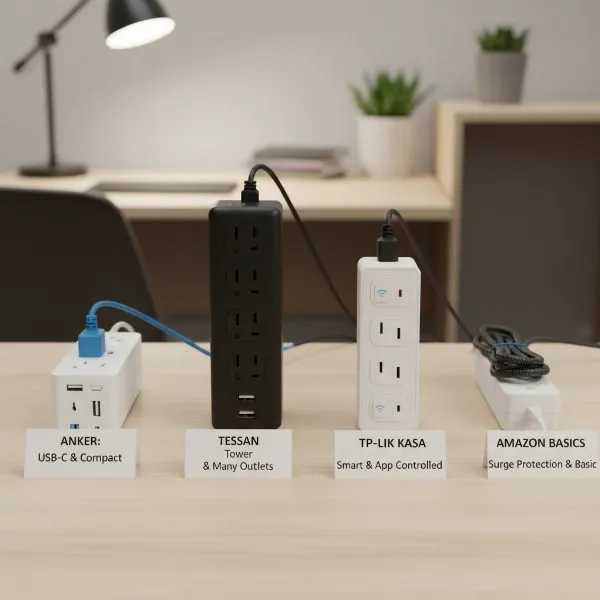
Top 3 Power Strips to Consider Today
Based on performance, features, safety, and user feedback, here are three highly-rated power strips that cater to different needs:
-
Anker Surge Protector Power Strip:
- Pros: Often boasts high joule ratings (e.g., 2100-2880 Joules), multiple AC outlets with wide spacing, frequently includes USB-A and USB-C ports with fast charging, known for robust build quality and reliability. Many models come with a solid warranty.
- Cons: Can be pricier than basic options, some users might find the design utilitarian.
- Why it’s a Top Pick: Excellent all-around performance for home and office, combining strong surge protection with convenient USB charging. Ideal for users with a mix of traditional and modern devices.
-
TP-Link Kasa Smart Wi-Fi Power Strip (Model HS300):
- Pros: Six individually controllable smart AC outlets, three USB charging ports, energy monitoring capabilities, seamless integration with smart home ecosystems (Alexa, Google Assistant), “away” mode for security.
- Cons: Higher price point, requires a Wi-Fi connection, slightly larger footprint.
- Why it’s a Top Pick: The best choice for smart home enthusiasts looking to automate and monitor their power usage. Offers unparalleled control and energy-saving features for a modern digital lifestyle.
-
TESSAN Flat Plug Extension Cord Power Strip:
- Pros: Compact design with a flat plug (often 45-degree angle) ideal for tight spaces behind furniture, good for travel (many are non-surge for cruises), often includes multiple AC outlets and USB ports, generally affordable.
- Cons: Specific models may lack surge protection (verify carefully), USB charging speeds can vary.
- Why it’s a Top Pick: Perfect for users needing a space-saving solution, especially for travel or areas with limited access behind furniture. Provides a good balance of outlets and USB ports in a highly portable format.
[image-1|best-power-strips-comparison|A side-by-side comparison of various power strip types, highlighting their features and differences in a clear, illustrative style|
An illustrative infographic comparing three different types of power strips: a basic one, a surge protector, and a smart power strip. Each power strip type is distinctively drawn with their key features labeled (e.g., multiple outlets, surge protection indicator, USB ports, Wi-Fi symbol). The background is a clean, modern home office setting with various electronic devices plugged in, showing the power strips in use. The overall style is clean, modern, and easy to understand.]
Safe Use and Maintenance of Power Strips
Even the most advanced power strip requires proper usage and maintenance to ensure safety and longevity. Misuse can lead to overheating, electrical fires, and damaged equipment.
How to Use a Power Strip Safely
- Avoid Overloading: Never exceed the power strip’s maximum wattage or amperage rating. Connecting too many high-power devices can overload the circuit, leading to overheating or triggering the circuit breaker. This is especially true for appliances like space heaters, microwaves, or refrigerators, which should ideally be plugged directly into a wall outlet.
- No “Daisy-Chaining”: Never plug one power strip into another, or into an extension cord. This practice, known as daisy-chaining, significantly increases the risk of overloading and fire. If you need more outlets or a longer reach, buy a single unit designed for that purpose.
- Proper Placement: Place power strips in well-ventilated areas, away from heat sources, and out of reach of children and pets. Avoid covering them with carpets, rugs, or furniture, as this traps heat and can lead to overheating. Keep them away from water and wet environments.
- Inspect Regularly: Periodically check your power strips and cords for any signs of damage, such as frayed wires, cracked casings, discolored outlets, or loose connections. Any damaged unit should be immediately unplugged and replaced.
- Pull the Plug, Not the Cord: When unplugging devices or the power strip itself, always grasp the plug firmly, not the cord. Pulling the cord can damage the internal wiring, creating a fire hazard.
How to Maintain Your Power Strip to Extend its Lifespan
- Keep it Clean: Dust and debris can accumulate in outlets and on the strip itself, potentially causing short circuits or hindering heat dissipation. Regularly wipe down the power strip with a dry cloth.
- Store Properly: When not in use, store power strips in a cool, dry place. Avoid tightly coiling cords, as this can stress the wires. Use cable ties or organizers to keep cords neat and untangled.
- Monitor Indicator Lights: For surge protector power strips, pay attention to any indicator lights (e.g., “Protected” or “Grounded”). If the “Protected” light goes out, it means the surge protection has been compromised and the strip should be replaced, even if it still provides power.
- Replace Old Units: Power strips, especially surge protectors, are not designed to last forever. Over time, components degrade. Consider replacing older units (typically every 3-5 years for surge protectors, or after a major power surge) to ensure optimal protection and safety.
Conclusion
Choosing the right power strip is more than just a matter of convenience; it’s a critical decision for protecting your valuable electronics and ensuring electrical safety in your home or office. From basic models that expand your outlets to advanced smart strips that offer remote control and energy monitoring, the market provides solutions for every need. By carefully evaluating your device requirements, prioritizing essential safety features like surge protection and circuit breakers, and adhering to safe usage and maintenance practices, you can confidently select a power strip that serves you reliably for years to come. What kind of power strip will empower your setup today?
Frequently Asked Questions
What is the main difference between a power strip and a surge protector?
The main difference lies in protection. A basic power strip merely provides additional outlets but offers no defense against voltage spikes. A surge protector, however, includes specialized components like Metal Oxide Varistors (MOVs) to absorb or divert excess voltage, protecting connected devices from damage during a power surge. Always check for a joule rating to confirm it’s a true surge protector.
Can I plug high-power appliances into a power strip?
It is generally not recommended to plug high-power appliances such as space heaters, refrigerators, air conditioners, or microwaves into a power strip. These devices draw significant current and can easily overload a standard power strip, leading to overheating, tripping circuit breakers, or even electrical fires. They should ideally be plugged directly into a wall outlet.
How do I know if my surge protector is still working?
Most surge protector power strips feature indicator lights, typically labeled “Protected” or “Grounded.” If the “Protected” light is off, it means the surge protection components have worn out or been compromised, and the unit can no longer protect your devices from surges. Even if the strip still provides power, it should be replaced.
Are smart power strips worth the investment?
Smart power strips can be a worthwhile investment, especially for those looking to enhance energy efficiency and home automation. Their ability to remotely control outlets, schedule power delivery, and monitor energy consumption can lead to significant savings on electricity bills by eliminating “vampire” power drain and providing greater convenience in managing your devices.
Can travel power strips be used on cruise ships?
Many travel power strips are specifically designed without surge protection to comply with cruise ship regulations, as surge protectors can sometimes interfere with a ship’s electrical systems. Always verify that a travel power strip is explicitly labeled “non-surge protected” or suitable for cruise ships before packing it for your voyage.