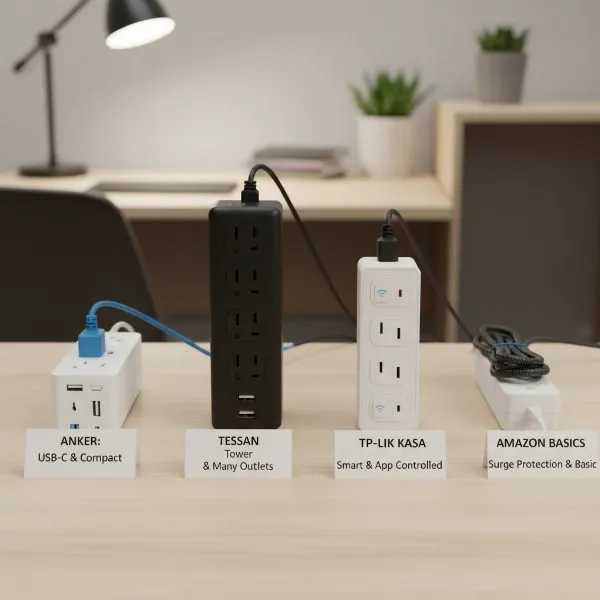
In today’s fast-paced digital world, a single monitor often isn’t enough. Whether you’re a gamer, a designer, a programmer, or simply someone who thrives on multitasking, a multiple monitor setup has become indispensable. However, managing the power needs of your PC, two, three, or even four monitors, speakers, docking stations, and charging cables can quickly lead to a tangled mess of wires and a shortage of available outlets. This isn’t just an aesthetic problem; it can also pose significant safety risks if not managed properly. The solution lies in choosing the right power strip—a device specifically designed to safely and efficiently power your entire command center. This guide will walk you through everything you need to know to select the perfect power strip, ensuring your multi-monitor setup is both powerful and protected.

What is a Power Strip and Why Do You Need One?
A power strip, also known as an extension block, multi-socket outlet, or multi-plug adapter, is essentially a block of electrical sockets that attaches to the end of a flexible cable, allowing multiple electrical devices to be powered from a single wall outlet. Beyond simply expanding the number of available sockets, modern power strips offer a host of features crucial for a complex setup like one involving multiple monitors. They centralize power distribution, helping to reduce cable clutter and maintain a tidy workspace.
For a multi-monitor setup, a power strip is not merely a convenience; it’s a necessity. You’ll likely need to power your desktop computer or laptop, two or more monitors, external speakers, a docking station, potentially a printer, and various chargers for your phone, tablet, and wireless accessories. A standard wall outlet typically only offers two receptacles, making it impossible to connect all these devices without an external solution. Furthermore, a good power strip often includes vital safety features like surge protection, safeguarding your valuable electronics from unexpected power fluctuations and spikes.
Types of Power Strips for Your Setup
The world of power strips is more diverse than you might imagine, with various types designed to meet specific needs. Understanding these differences is crucial for selecting the ideal power strip for your multi-monitor workstation.
Basic Power Strip
A basic power strip is the simplest form of a multi-outlet device. It provides several additional AC outlets from a single wall socket. These strips typically lack advanced features such as surge protection or USB charging ports.
- Description: A simple extension cord with multiple outlets.
- Pros: Very affordable, widely available, provides extra outlets.
- Cons: Offers no protection against power surges or spikes, typically has no smart features.
- Suitable for: Connecting non-sensitive devices or temporary setups where electrical protection is not a primary concern. However, for computer equipment, it is generally advised to opt for strips with surge protection.
|
Our Picks for the Best Power strip in 2026
As an Amazon Associate I earn from qualifying purchases.
|
||
| Num | Product | Action |
|---|---|---|
| 1 | 6Ft Power Strip Surge Protector - Yintar Extension Cord with 6 AC Outlets and 3 USB Ports for for Home, Office, Dorm Essentials, 1680 Joules, ETL Listed, (Black) |

|
| 2 | Anker Power Strip with 2100J Surge Protector, Outlet Extender, 5ft Extension Cord with Multiple Outlets, 12 AC, 2 USB A,1 USB C Port for 20W, Home Office, Dorm Room Essentials, TUV Listed |
|
| 3 | KMC 6-Outlet Surge Protector Power Strip 2-Pack, 900 Joules, 4-Foot Extension Cord, Overload Protection, Black |
|
| 4 | Belkin 12-Outlet Surge Protector Power Strip w/ 12 AC Outlets & 8ft Flat Plug, UL-Listed Heavy-Duty Extension Cord for Home, Office, Travel, Computer, Laptop, Charger - 3,940 Joules of Protection |
|
| 5 | Surge Protector Power Strip - Nuetsa Flat Plug Extension Cord with 8 Outlets and 4 USB Ports, 6 Feet Power Cord (1625W/13A), 2700 Joules, ETL Listed, Black |
|
| 6 | Surge Protector Power Strip - HANYCONY 8 Outlets 4 USB (2 USB C) Charging Ports, Multi Plug Outlet Extender, 5Ft Braided Extension Cord, Flat Plug Wall Mount Desk Charging Station for Home Office ETL |
|
| 7 | Power Strip Surge Protector, Olcorife Ultra Thin Flat Plug Extension Cord 5ft, 6 Outlets 3 USB Ports(1 USB C), 3 Sided Outlet Extender for Home Office Travel Dorm Room Essentials, White |
|
| 8 | 6 Ft Surge Protector Power Strip - 8 Widely Outlets with 4 USB Ports, 3 Side Outlet Extender with 6 Feet Extension Cord, Flat Plug, Wall Mount, Desk USB Charging Station, ETL,White |
|
| 9 | Power Strip, ALESTOR Surge Protector with 12 Outlets and 4 USB Ports, 6 Feet Extension Cord (1875W/15A), 2700 Joules, ETL Listed, Black |
|
| 10 | Wall Charger, Surge Protector, QINLIANF 5 Outlet Extender with 4 USB Charging Ports, 3-Sided 1680J Power Strip Multi Plug Adapter Spaced for Home Travel Office |
|
Surge Protector
A surge protector is an essential upgrade from a basic power strip, offering crucial defense for your sensitive electronics. It’s designed to protect devices from voltage spikes or “surges” that can occur due to lightning strikes, utility issues, or even sudden changes in electricity demand within your home.
- Description: A power strip equipped with internal components (like MOVs – Metal Oxide Varistors) that divert excess voltage away from connected devices, absorbing or clamping down dangerous power spikes.
- Pros: Absolutely vital for protecting expensive equipment like PCs, monitors, and gaming consoles; comes with varying levels of protection measured in Joules.
- Cons: More expensive than basic strips, the surge protection capacity degrades over time, eventually requiring replacement.
- Suitable for: Any setup involving computers, multiple monitors, high-end audio/visual equipment, or other sensitive and valuable electronics that you want to shield from electrical damage.
Smart Power Strip
Stepping into the realm of modern convenience, smart power strips integrate with your smart home ecosystem, offering advanced control and energy management features. These strips often connect via Wi-Fi and can be controlled through a smartphone app or voice assistants.
- Description: A power strip with Wi-Fi connectivity, allowing remote control of individual outlets, scheduling, and energy monitoring.
- Pros: Enables remote power cycling, automation of device power states (e.g., turning off monitors automatically at night), energy usage tracking, and integration with smart home routines.
- Cons: Generally the most expensive type, requires a Wi-Fi connection, can sometimes be more complex to set up.
- Suitable for: Tech-savvy users, smart home enthusiasts, or home office users looking to optimize energy consumption and automate their workspace.
USB Power Strip
With the proliferation of USB-powered devices, power strips featuring integrated USB-A and/or USB-C charging ports have become incredibly popular. These eliminate the need for bulky wall adapters, freeing up AC outlets and simplifying your charging routine.
- Description: A power strip that combines traditional AC outlets with multiple USB charging ports, often including fast-charging (e.g., Power Delivery or Quick Charge) capabilities.
- Pros: Reduces cable clutter by eliminating wall warts, provides convenient and often faster charging for phones, tablets, and other USB accessories, frees up AC outlets for larger devices.
- Cons: USB ports can become technologically outdated faster than AC outlets (e.g., USB-A vs. USB-C PD).
- Suitable for: Any modern workstation with multiple monitors, especially those with numerous mobile devices, wireless peripherals, or accessories that charge via USB.
Travel Power Strip
Designed for portability and versatility, travel power strips are compact, lightweight versions of their larger counterparts. They often feature a few AC outlets and multiple USB ports, sometimes with interchangeable plugs for international use.
- Description: A small, portable power strip, often cube-shaped or with a retractable cord, optimized for minimal space and including universal or region-specific AC outlets and USB ports.
- Pros: Highly portable, ideal for presentations or temporary setups outside your main workstation, some models offer international compatibility.
- Cons: Typically has fewer AC outlets, lower surge protection capacity, and may not handle heavy loads from a full multi-monitor setup as effectively.
- Suitable for: Mobile professionals, students, or anyone needing to power a laptop, one or two monitors, and charge devices while on the go or in temporary locations.
Comparison Table: Power Strip Types at a Glance
| Feature | Basic Power Strip | Surge Protector | Smart Power Strip | USB Power Strip | Travel Power Strip |
|---|---|---|---|---|---|
| Function | Extends outlets | Extends outlets, protects surges | Extends outlets, smart control, energy monitor | Extends outlets, USB charging | Extends outlets, portable |
| Price Range | Low ($10-$20) | Medium ($20-$50+) | High ($40-$80+) | Medium ($25-$60+) | Medium ($20-$45) |
| Durability | Varies, often basic | Good, robust | Good, but relies on tech | Good | Varies, often compact |
| Special Features | None | Joules rating, indicator lights | Wi-Fi control, scheduling, energy reports | USB-A/C ports, fast charging | Compact, retractable cord, international adapters (some) |
| Best Application | Non-sensitive, temporary | PCs, monitors, valuable electronics | Smart homes, energy-conscious users | Modern setups with many mobile devices | Mobile professionals, temporary workspaces |
How to Choose the Right Power Strip for Your Multiple Monitor Setup (Buying Guide)
Selecting the best power strip for a multi-monitor setup involves more than just picking one with enough outlets. You need to consider power capacity, protection, and practical design elements.
Assess Your Usage Needs
Start by taking inventory of your current and future needs.
- Number of Outlets: Count every device that requires an AC plug: your PC, each monitor, speakers, a docking station, a desk lamp, and any other peripherals. Consider adding a few extra for future upgrades or occasional use. A setup with two or three monitors might easily require 8-12 AC outlets, especially if you have bulky power bricks.
- Types of Devices: Are you mostly plugging in low-power chargers, or high-draw gaming PCs and large monitors? This impacts the necessary power capacity. Do you have many devices that charge via USB, making integrated USB-A or USB-C ports beneficial?
- Placement: Where will the power strip sit? On the floor, mounted under your desk, clamped to the desk edge, or even wall-mounted? This dictates the required cord length, plug type (a flat plug is excellent for behind furniture), and physical form factor (strip, tower, or clamp).
Key Technical Considerations
Technical specifications are paramount for safety and performance, particularly with valuable electronics.
- Maximum Wattage/Amperage: Most standard household circuits in North America are rated for 15 amps (15A) at 120 volts, meaning they can safely handle up to 1800 watts (15A x 120V). Your power strip should have a rating equal to or greater than the combined wattage of all devices you intend to plug in. While a gaming PC and multiple monitors can draw substantial power (e.g., 500W-1000W+ for a high-end PC and 50-100W per monitor), they typically stay well below the 1800W limit of a single circuit. Always check the wattage ratings on your devices.
- Surge Protection (Joules): This is critical for protecting your monitors and PC. The joule rating indicates how much energy the surge protector can absorb before it fails. For sensitive electronics like computers and monitors, aim for a surge protector with at least 1000-2000 Joules, with 3000-4000+ Joules providing even more robust protection. Higher joule ratings mean longer lifespan and better defense against significant power spikes.
- Safety Standards & Certifications: Always look for power strips that are UL listed (Underwriters Laboratories) or have similar recognized safety certifications. This ensures the product meets stringent safety standards. Essential safety features include overload protection (a circuit breaker that trips if the power strip is overloaded, preventing overheating and fire), and construction with flame-retardant materials.
- Outlet Spacing and Orientation: Many power adapters (“wall warts”) are bulky and can block adjacent outlets on a standard strip. Look for power strips with widely spaced outlets, rotating outlets (like Belkin’s Pivot-Plug models), or a design that accommodates larger plugs without sacrificing usability.
Brands and Pricing
Investing in a reputable brand often means better quality, reliability, and warranty protection.
- Reputable Brands: Brands consistently recommended for power strips and surge protectors include Belkin, Anker, Tripp Lite (by Eaton), CyberPower, Monoprice, and APC. These companies are known for their quality control and customer support.
- Price Range: Basic power strips are typically inexpensive ($10-20). Surge protectors range from $20-50+, depending on joule rating and features. Smart power strips or those with advanced USB-C PD capabilities can cost $40-80 or more. Balance your budget with the level of protection and convenience you need for your valuable setup.
User Reviews and Expert Opinions
Before making a final decision, consult user reviews on reputable retail sites and read professional reviews from tech publications. Look for consistent feedback regarding durability, actual performance (e.g., “do the USB ports actually fast charge?”), and any common issues. Expert opinions can often highlight nuanced pros and cons that aren’t immediately apparent.
Top 5 Power Strips for Multiple Monitor Setups
Based on comprehensive research and essential features for multi-monitor users, here are some top power strip recommendations that combine ample outlets, robust protection, and smart design.
-
Belkin 12-Outlet Pivot-Plug Surge Protector
- Description: This full-featured surge protector boasts 12 AC outlets, with 8 of them pivoting to accommodate oversized power adapters. It offers substantial surge protection.
- Key Features for Multi-Monitor Use: Excellent outlet spacing, high joule rating (often 4320 Joules), 8 pivoting outlets to prevent blocking, master on/off switch.
- Pros: Outstanding for managing bulky power bricks, very high surge protection, large number of outlets, durable build.
- Cons: Can be large, no integrated USB ports.
-
Anker 351 Power Strip (or Anker PowerPort Strip 12)
- Description: Anker is known for reliable power solutions. The 351 offers a blend of AC outlets and fast-charging USB ports in a sleek, desk-friendly design, often with a flat plug.
- Key Features for Multi-Monitor Use: Generous number of AC outlets (e.g., 12 AC + 3 USB on PowerPort Strip 12), good surge protection (e.g., 2100 Joules for 351), includes USB-A and USB-C for device charging, flat plug for easy placement behind furniture.
- Pros: Balances AC and USB needs, compact design, reliable surge protection, typically excellent build quality.
- Cons: Outlet spacing might still be tight for many large wall warts simultaneously.
-
JACKYLED Surge Protector Charging Station (Tower Style)
- Description: This vertical tower power strip is an excellent space-saving solution, providing numerous outlets and USB ports with a compact footprint.
- Key Features for Multi-Monitor Use: High density of outlets (e.g., 10 AC outlets, 4 USB ports), vertical design saves desk space, often includes a retractable cord for neatness, independent switches for different outlet levels.
- Pros: Maximizes outlet count in a small area, great for cable management, easily accessible outlets.
- Cons: Surge protection rating (e.g., 900 Joules) might be lower than dedicated strip-style surge protectors, not ideal for the most sensitive equipment without additional protection.
-
Monoprice 12-Outlet Power Surge Protector with USB Ports
- Description: Monoprice offers robust and often cost-effective power solutions. This model provides a high number of protected outlets alongside USB charging.
- Key Features for Multi-Monitor Use: High AC outlet count (12 outlets), built-in surge protection, typically includes USB-A charging ports, often at a competitive price.
- Pros: Great value for the number of outlets and included surge protection, straightforward and functional design.
- Cons: May not have advanced features like pivot plugs or USB-C PD, design can be more utilitarian.
-
Tessan Flat Plug Extension Cord Power Strip (Desk Clamp or Mountable Style)
- Description: For those prioritizing desk organization and easy access, mountable or clamp-on power strips are ideal, placing power exactly where you need it.
- Key Features for Multi-Monitor Use: Mountable/clamp design for convenient access, typically includes a good mix of AC and USB ports, flat plug, good for keeping cables off the desk.
- Pros: Exceptional for cable management and desk aesthetics, puts power within arm’s reach, prevents needing to reach under desks.
- Cons: Fewer total outlets compared to larger strip or tower models, specific mounting requirements.
Safe Usage and Maintenance of Power Strips
Ensuring the longevity of your power strip and the safety of your multi-monitor setup requires adherence to best practices for usage and maintenance.
Firstly, always plug your power strip directly into a grounded wall outlet. Never “daisy-chain” power strips by plugging one into another, as this dramatically increases the risk of overloading circuits and can lead to electrical fires. Each layer of daisy-chaining undermines safety features and the overall protection offered.
Secondly, prevent overloading. Be mindful of the total wattage consumed by all devices connected to your power strip. As discussed, most standard strips are rated for 1800 watts. If you notice your power strip feeling warm to the touch, or if the circuit breaker on your wall frequently trips, you are likely overloading it. Disconnect some devices or distribute them across different wall circuits. Modern surge protectors often include an overload protection switch that automatically cuts power if the load becomes too high, which is a critical safety feature.
Effective cable management is not just about aesthetics; it’s also a safety measure. Organize your cords neatly to prevent tripping hazards, reduce strain on the cables and outlets, and improve airflow around your electronics. Utilize cable ties, sleeves, or cable management trays to keep wires tidy.
Regularly inspect your power strip and its cords for any signs of damage, such as frayed wires, cracked housing, or discolored outlets. If you find any damage, replace the power strip immediately. Keep your power strip clean and avoid exposing it to wet or excessively humid environments unless it is specifically designed with GFCI (Ground Fault Circuit Interrupter) protection. Remember that the surge protection components within a surge protector have a finite lifespan and degrade with each surge they absorb. Most manufacturers recommend replacing surge protectors every 3-5 years, or immediately after a significant power event like a lightning strike. An indicator light on the surge protector usually signals if the protection is still active.
“Many users overlook the simple act of checking their power strip’s health. A dead surge protector offers no more protection than a basic extension cord, leaving your valuable equipment vulnerable.” – Electrical Safety Foundation International (ESFI)
Conclusion
Building an efficient and protected multiple monitor setup hinges on selecting the right power strip. By carefully considering the number and type of outlets, the crucial role of surge protection, and practical design elements like outlet spacing and cord length, you can create a powerful, organized, and safe workspace. Whether you opt for a high-joule surge protector to guard against power spikes, a USB-equipped strip to declutter your charging, or a smart strip for ultimate automation, the right choice will enhance your productivity and protect your investment. Take the time to assess your specific needs, compare features, and prioritize safety, ensuring your multi-monitor command center remains a source of power and peace of mind. What kind of innovative features would make your ideal power strip even better?
Frequently Asked Questions
How many monitors can I plug into one power strip?
You can safely plug multiple monitors into a single power strip, along with your PC and peripherals, as long as the total wattage drawn by all connected devices does not exceed the power strip’s maximum wattage rating (typically 1800W for a 15A/120V strip) and the wall circuit’s capacity. Modern monitors are generally low-wattage (50-100W each), so a multi-monitor setup typically won’t overload a standard power strip.
Is a surge protector necessary for monitors?
Yes, a surge protector is highly recommended for monitors, especially expensive ones or those connected to a gaming PC. Power surges can cause immediate or gradual damage to electronics. A surge protector acts as a buffer, diverting excess voltage and safeguarding your screens from harmful electrical spikes.
What is a good joule rating for a monitor setup?
For a multi-monitor setup and a PC, a surge protector with a joule rating of at least 1000-2000 Joules is advisable. For maximum protection and longevity, especially with high-end equipment, aim for 3000-4000 Joules or higher. Higher joule ratings indicate a greater capacity to absorb energy from surges.
Can I plug a power strip into another power strip?
No, you should never plug one power strip into another. This practice, known as “daisy-chaining,” creates a serious fire hazard by increasing the risk of overloading the wall outlet and the entire electrical circuit, bypassing crucial safety mechanisms, and potentially causing overheating.
What is the difference between a power strip and an extension cord?
A power strip provides multiple outlets for connecting several devices, often including features like surge protection and USB charging ports. An extension cord, on the other hand, is designed to extend the reach of a single electrical outlet, typically featuring only one or two receptacles at its end and usually lacking surge protection or other advanced features.